
What Is a Cloud Phone For? Top 10 Mainstream Use Cases in 2026
What Is a Cloud Phone? Explained in One Sentence
Many people hear “cloud phone” and assume it's some new physical handset. It's quite the opposite—a cloud phone is a “virtual phone” with no physical body: its operating system, computing power, and storage all run on servers in remote data centers. You simply open a client app on your computer or phone and remotely control this Android device “living in the cloud.”
Here's an analogy: a traditional phone is like a PC you buy for your home, while a cloud phone is like a machine at an internet café—connect whenever you need it, disconnect when you're done, and it takes up no space or battery on your own devices. By 2026, cloud phones have long outgrown their niche geek-tool origins and become an everyday productivity tool for gamers, e-commerce sellers, and content creators.
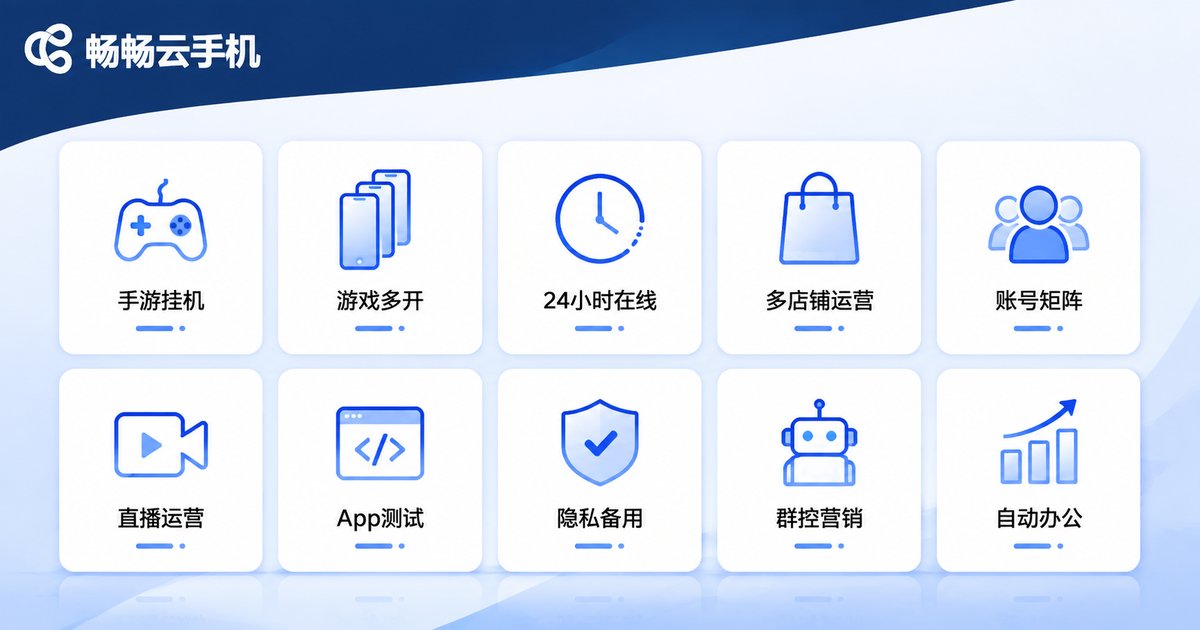
Top 10 Mainstream Use Cases in 2026
Use Case 1: Mobile Game Multi-Account AFK Farming
This is the most classic cloud phone use. Many mobile games revolve around daily quests, stamina regeneration, and idle rewards, but one physical phone can only maintain one account. Spread multiple accounts across several cloud phones and let them farm automatically in the cloud 24/7 while your local phone stays free—game farmers use this model to turn grinding into lying down.
Use Case 2: Game Multi-Boxing and Synced Operations
Want to control multiple characters in the same game at once? Cloud phones support mass multi-boxing, and some services add group-control sync: tap once on the master device and dozens of cloud phones execute the same action—leveling alts and clearing dungeons at double speed.
Use Case 3: 24/7 Online Hosting
Some apps are only valuable when “always online”: game idling, live-room monitoring, community management... Running a physical phone around the clock means overheating, battery drain, and hardware wear. Cloud phones run on data-center servers—no power worries, no overheating, no drain on local resources. Switch off your own phone and your cloud accounts stay online.
Use Case 4: Cross-Border E-Commerce Multi-Store Management
Cross-border sellers know how strictly platforms police multiple stores linked to the same device—one slip can mean throttled traffic or even a ban. Assign one cloud phone per store and every shop gets an independent, clean device environment for logging in, listing products, and replying to messages—the standard setup for multi-store management.
Use Case 5: Social Media Account Matrix
Whether you run short-video account matrices, product-review accounts, or overseas social promotion, you need to maintain a large number of accounts at once. Cloud phones keep every account in an independent “clean device,” lowering the risk of being flagged as a marketing account, while teams collaborate and manage remotely.
Use Case 6: Live Streaming Operations
Live-commerce teams use cloud phones to manage multiple streaming accounts, monitor room data, and maintain fan groups. After the host goes offline, cloud phones keep the fan groups engaged and post previews—the person rests, the account doesn't.
Use Case 7: App Development and Compatibility Testing
Before releasing an app, developers must test across many device models and OS versions. Buying dozens of real phones is expensive. Cloud phones let you spin up cloud devices with different specs and system versions on demand and release them when testing is done—cost-effective and efficient.
Use Case 8: Privacy Protection and Temporary Backup Device
Signing up for rarely-used apps, receiving verification codes, or logging into unfamiliar platforms—don't want to expose your main phone's information? Use a cloud phone as a “disposable secondary device,” reset it with one tap when finished, and keep private data fully isolated from your main phone.
Use Case 9: Enterprise Group Control and Marketing Automation
Marketing teams often operate dozens or hundreds of touchpoints at once. Through a cloud phone's batch management console, one person can handle every device—bulk-installing apps and running scripts—handing repetitive work to automation.
Use Case 10: Office Automation and Data Collection
Combined with automation scripts, cloud phones can collect public market data on schedule, monitor product prices, and auto check in—serving as lightweight cloud-based automation nodes.
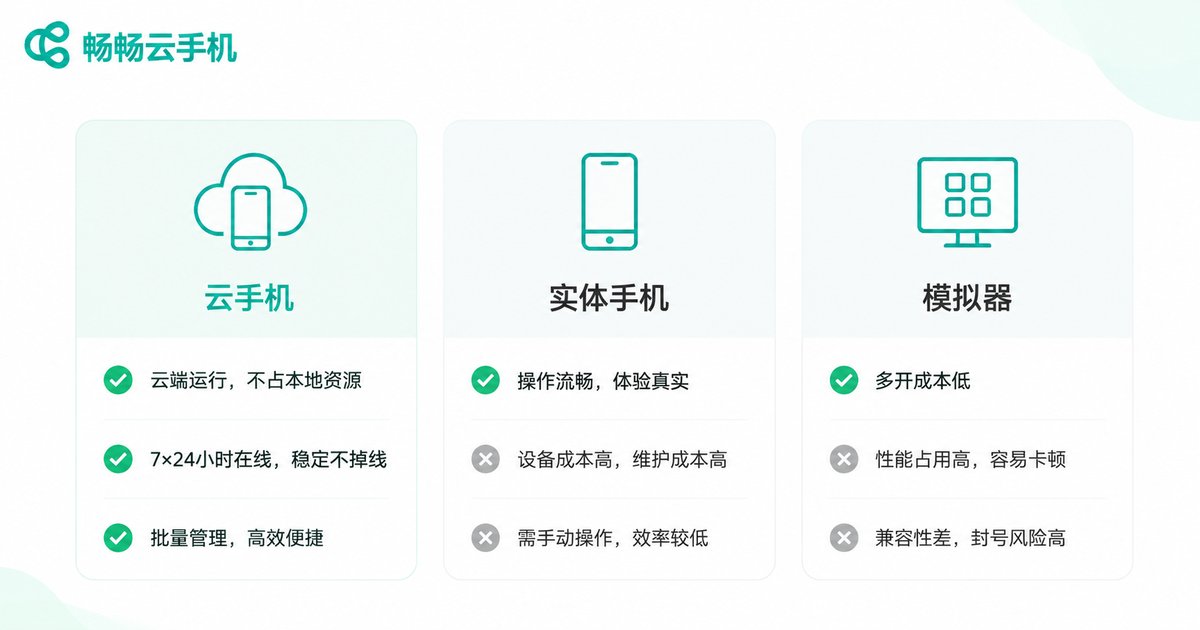
Cloud Phone, Physical Phone, or Emulator: Which One?
Many people ask: isn't installing an Android emulator on your PC just as good? Take a look at this comparison first:
| Factor | Cloud Phone | Physical Phone | Local Emulator |
|---|---|---|---|
| Local resource usage | Nearly none | No performance cost, but takes physical space | Heavy drain on PC performance |
| 24/7 online | Yes, data-center grade stability | Yes, but with heavy wear | Requires the PC to stay on |
| Multi-instance count | Easily scale to dozens or hundreds | Limited by physical count | Limited by PC specs |
| Device independence | Independent environment per device | Naturally independent | Environment easily fingerprinted |
| Cost | Flexible monthly subscription | High one-time purchase cost | Free software, but power and hardware wear |
Bottom line: an emulator is fine for light single-instance use; choose a cloud phone for heavy multi-boxing and always-on workloads, and keep your physical phone for daily personal use.
How to Pick a Reliable Cloud Phone
There are plenty of cloud phone products out there. Focus on four things when choosing:
1. Stability: Server quality determines disconnect frequency. Prioritize providers with self-built data centers or major cloud infrastructure.
2. Image quality and latency: Streaming quality and input lag directly affect the experience. Try before you commit.
3. Feature completeness: Multi-boxing, group control, batch management, ROOT access, independent anti-association environments—the fuller the toolkit, the fewer headaches later.
4. Customer support: Is technical support responsive? Can issues be resolved quickly?
Take cCloudPhone (ChangChang Cloud Phone) as an example: it provides cloud Android devices with multi-device management and batch operations, well suited for game multi-boxing, e-commerce operations, and account matrix management. Check the official website for the latest plans and pricing.
FAQ
Q: Do I need to keep my computer or phone on all the time?
No. Cloud phones run on remote servers. Even if you shut down your local devices, the cloud phone keeps running—just reconnect through the client when you need to operate it.
Q: What's the difference between a cloud phone and an emulator?
An emulator runs on your own PC, consuming local performance and requiring the PC to stay on. A cloud phone runs in a remote data center, uses no local resources, can stay online 24/7, and offers a more independent device environment.
Q: Will using a cloud phone get my game or platform accounts banned?
Any multi-account activity carries platform risk-control risk. Follow the relevant platforms' terms of service and use cloud phones responsibly and compliantly.
Q: Is a cloud phone beginner-friendly?
Yes. Take cCloudPhone—the interface looks and works just like a real Android phone. If you can use a smartphone, you can use a cloud phone with virtually no learning curve.
Q: Is my data safe on a cloud phone?
Reputable providers store data in professional cloud data centers. Choose a provider with a good reputation and avoid storing sensitive personal information on cloud phones.


