

Cloud Phone Usage Auditing in 2026: Team Operation Standards and Risk Control
In 2026, the Hard Part of Cloud Phones Is No Longer Capacity
A couple of years ago, the reason to use cloud phones was simple: they run, they save hardware, and you can run many at once. Few devices, few people, and a quick message in the team chat told you who was using what. By 2026, a mid-sized operations or QA team routinely manages dozens or even hundreds of cloud phone instances: devices are shared across teams in shifts, contractors and part-timers join temporarily, and automated scripts run on the same timeline as human work.
The thing that actually hurts is no longer whether you have enough cloud phones, but whether you can prove who performed that last action, on what basis, and whether it can be traced back. That is exactly what usage auditing solves: it turns actions from verbal explanations into searchable records, and turns rules from something written in a document into something the workflow only allows one way.
What Auditing Really Covers: Four Dimensions
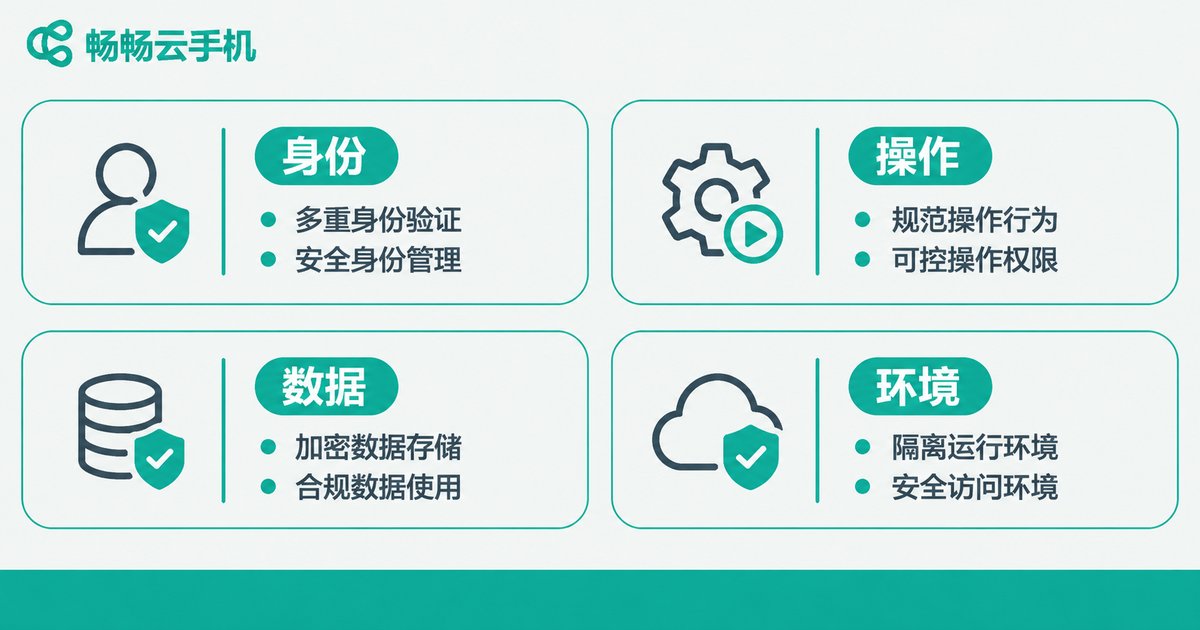
When teams hear the word auditing, the first thought is screen recording. Recording is useful, but it is the last line of defence — expensive and hard to search. A cloud phone audit that survives more than a quarter usually covers four dimensions.
| Dimension | Typical state without auditing | Controllable state once in place |
|---|---|---|
| Identity | One account shared by several people | One person, one instance; actions trace to a human |
| Actions | Nobody can say who changed a setting | Key actions logged and replayable on a timeline |
| Data | Leaked screenshots with no traceable source | Export approval, watermarking, outbound records |
| Environment | Physical devices scattered across versions | One image pushed to everyone, reproducible |
The dimension most often ignored is environment. With physical phones, models, OS versions and installed apps all differ, and reproducing an issue is hard. Cloud phones compress the environment into an image, and the same image pushed to everyone means each member gets the identical standard device. That is the foundation of any audit — if environments are inconsistent, even complete logs are hard to compare.
Team Operation Standards: Make the Right Way the Easiest Way
Rules that live only in a management document land at maybe thirty percent. The effective approach is to embed the rules in the tool, so that breaking them becomes impossible. Here are four you can copy directly.
1. One person, one instance, no shared logins. Shared accounts are the natural enemy of auditing — the record shows an account, not a person. Assign an independent instance to every member and bind it to the user, and accountability follows automatically. Put contractors and temporary staff in a separate group and recycle the whole group when the project ends; it is far less work than cleaning up device by device later.
2. Log key actions, leave ordinary ones alone. You do not need every click. Cover the actions that cause business impact when they go wrong: environment reset, bulk install and uninstall, permission changes, data export, instance transfer. Log those with a timeline view and you can reconstruct a chain of events in minutes.
3. Sensitive actions go through approval, not through favours. Bulk export, moving devices between groups, and editing shared images should require a second confirmation or an approval. The point is not to block people; it is to make the operator pause for a second and leave behind the context of why — which is precisely what post-incident reviews lack most.
4. Handover and offboarding need a checklist. Staff turnover is the highest-risk moment. Build an offboarding checklist: reclaim instances, rotate passwords and keys, remove shared image permissions, transfer unfinished tasks. Once it is a checklist, handover stops depending on memory and starts depending on ticks.

Five Lines of Defence for Risk Control
Applied to risk control, the standards above become five lines of defence from the outside in. The first two stop most problems; the last three make sure that when something does happen, you can find it and contain it.
| Line of defence | Practice | Risk it blocks |
|---|---|---|
| 1. Entry | Named members + dedicated instances + least privilege | Account sharing, privilege abuse |
| 2. Environment | Standard images, block unnecessary installs, periodic baseline checks | Environment drift, version chaos |
| 3. Behaviour | Log key actions, real-time alerts on anomalies | Mistakes, out-of-scope actions |
| 4. Data | Export approval, screenshot watermarking, outbound allowlist | Data leaks, screenshot spread |
| 5. Review | Weekly sampling, monthly audit summary | Repeat incidents, rules fading out |
Note that you do not need all five at once. Most teams start with the first two — low cost, fast results — and then gradually add behaviour and data capabilities.
Rollout Plan: Day 30, Day 60, Day 90
Month one: map what you have. List every cloud phone instance, its user, its project and its image version, and build one clear responsibility table. This step requires no new tooling, yet it surfaces about eighty percent of the blind spots.
Month two: lock the entry point. Get one-person-one-instance, group structure and least privilege working, and establish the offboarding checklist. This is where resistance shows up; pilot it with one team first, then expand.
Month three: add logging and review. Define the key action list, connect logging and alerts, and start a monthly sampling review. The review should not be a big meeting — one page covering what happened this week, which rule was bypassed, and how it will be fixed is far more effective than a long report.
Why This Audit Is Easier on Cloud Phones
The same standards land very differently on physical phones versus cloud phones. Physical devices are scattered across people: reinstalling means a site visit, handover means shipping, and post-incident review means memory. Cloud phones turn devices into centrally managed resources, with setup, distribution and recycling all happening in a console.
Take ccloudphone as an example. Cloud Android instances can be managed centrally by team group, environments are pushed through a unified image, a new member can be issued a standard device that matches the rest of the team within minutes, and offboarding can reclaim an entire group at once. For teams managing many devices at the same time, this bulk management capability solves the real question of whether the standard can be sustained — the more painful the process, the more people route around it; the smoother it is, the longer the standard survives.
In other words, auditing is not built by stacking stricter policies. It grows from tools that make doing it right the easiest option.

Frequently Asked Questions
Q1: Our team is only five or six people. Do we still need usage auditing?
Yes, but it can be minimal. Do at least two things: one person, one instance, and an offboarding checklist. Neither adds meaningful cost, and together they block the two most common incidents.
Q2: Will auditing slow the team down?
It depends on the layer you put it in. If it relies on manual forms and after-the-fact record keeping, it will be slow. If logging is the default behaviour of the system, members see no extra steps and speed is barely affected.
Q3: Will people feel they are being watched?
It comes down to how you frame it. Position auditing as protecting the operator rather than monitoring them — when something goes wrong, the record proves the step followed the process, which protects people who do the work properly. Also make clear that only key actions are logged, not blanket screen recording.
Q4: How long should records be kept?
At minimum, cover one full business cycle, such as a quarter. Scenarios involving accounts or public publishing may need longer. Write the retention period into the standard; it is worth more than an argument after the fact.
Q5: Physical phones plus screen recording software can do this too. Why cloud phones?
The cost of that setup sits mainly in people: someone manages the devices, someone watches the recordings, someone searches them. Cloud phones centralise devices and environments in the cloud, with setup and recycling measured in minutes, so the audit process can actually be sustained alongside your own logging workflow.


