

Cloud Phone Streaming Latency 30-120ms: Real Test Data From Sensitive Scenarios
What Do 30 to 120 Milliseconds Actually Feel Like?
One of the first questions new cloud phone users ask is: how much streaming latency is acceptable? We ran hands-on tests across four latency tiers of 30, 60, 90, and 120 milliseconds, covering the most latency-sensitive scenarios: MOBA skill combos, FPS aiming, rhythm game timing, and rapid flash-sale tapping. The short answer: below 60ms, most operations feel nearly native; above 90ms, time-sensitive actions start to feel noticeably half a beat behind.
Here is a useful benchmark: human tolerance between tapping a screen and perceiving the visual response sits roughly between 50 and 100 milliseconds. Below that range the phone feels in sync with your hand; above it, you instinctively feel something is off.
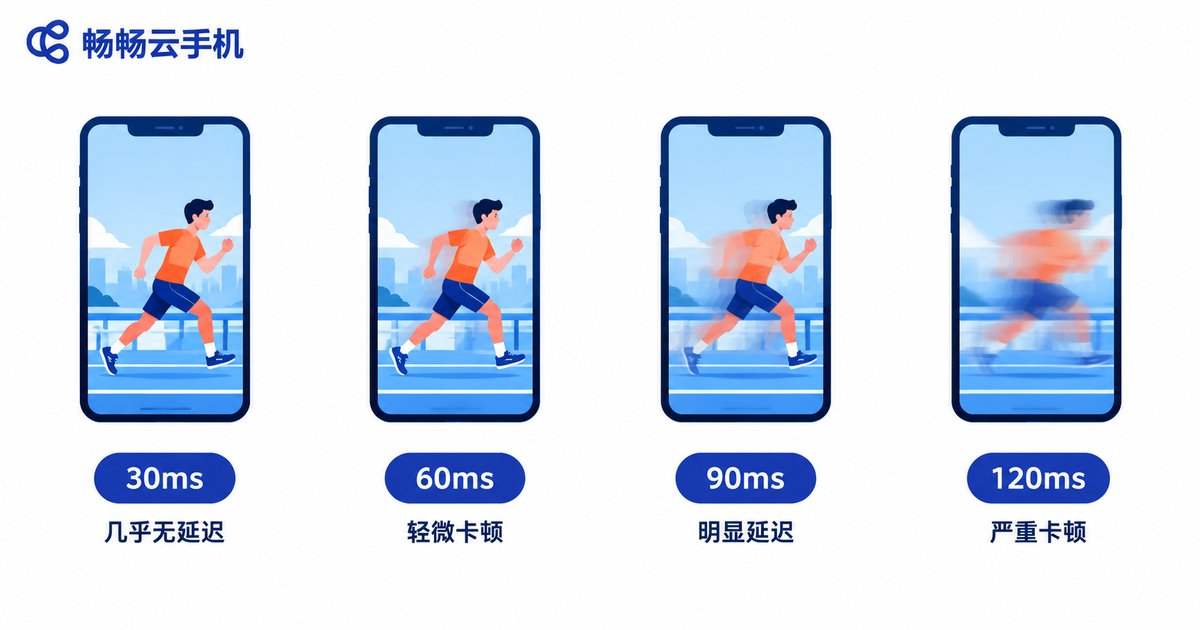
Real Test Data: Four Latency Tiers, Scenario by Scenario
Testing on the same network (300 Mbps broadband over 5GHz Wi-Fi) with the same mid-range phone as the streaming client, we simulated different latency tiers and recorded actual performance in each scenario:
| Latency Tier | MOBA Combos | FPS Tracking | Rhythm Game Timing | Scrolling & Tapping |
|---|---|---|---|---|
| Under 30ms | Near-native feel, combos hold | Responsive, stable recoil control | Judgment mostly accurate | Completely imperceptible |
| 30-60ms | Slight lag, acceptable | Normal aiming possible | Occasional one-step miss | Smooth |
| 60-90ms | Fast combos break, needs adaptation | Flick shots clearly delayed | Noticeable timing drift | Slight sluggishness |
| 90-120ms | Requires predicting inputs | Tracking very difficult | Judgment badly offset | Obvious stutter |
Key takeaways:
1. 30ms is the imperceptible line. At this level, even the most demanding players struggle to tell a cloud phone apart from a local device.
2. 60ms is the usable line. Social apps, video streaming, and idle farming run flawlessly; competitive games are playable after a short adjustment period.
3. 90ms is the experience divide. Rhythm game timing drifts noticeably, and reaction-based dodges in MOBAs succeed less often.
4. 120ms is the limit line. Apart from idle tasks and multi-account farming, real-time competitive play becomes genuinely difficult.
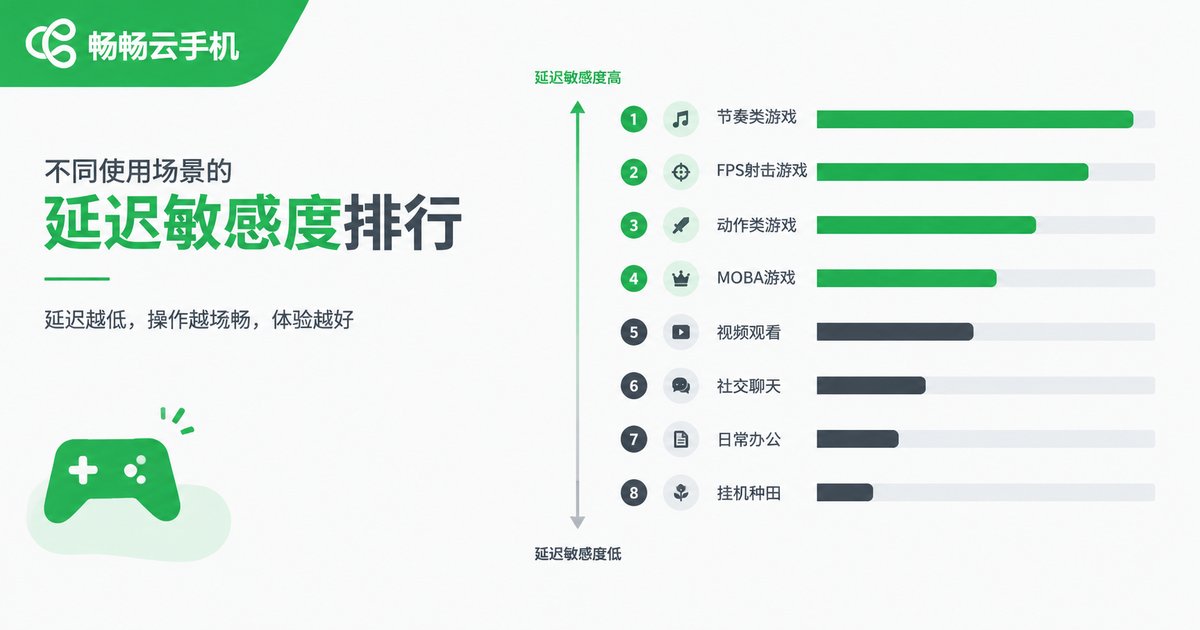
Latency Sensitivity Ranking by Scenario
Not every task cares about latency equally. Based on our tests, the sensitivity of common scenarios ranks roughly as follows:
| Scenario | Sensitivity | Acceptable Latency Ceiling |
|---|---|---|
| Rhythm games, FPS esports | Very high | Around 50ms |
| MOBA, real-time PvP | High | 60-80ms |
| Flash sales, rapid tapping | High | Around 80ms |
| Social apps, short videos | Medium | Anything under 120ms |
| Idle farming, multi-account tasks | Low | 150ms+ still workable |
This also explains why the same cloud phone feels just like a real device to one person and unusable to another — the difference usually lies in your use case and latency tier, not the cloud phone itself.
Where Latency Comes From: Anatomy of a Streaming Chain
Cloud phone latency is not caused by a single step — it is the sum of every stage in the chain: local touch capture → video encoding → network transmission → cloud-side decoding and execution → video capture → local decoding and rendering. Every stage takes time. Network transmission and encoding/decoding usually account for more than half of total latency, while physical distance sets the floor — if the data center is over a thousand kilometers away, the speed of light plus routing hops alone add a fixed cost of a dozen milliseconds or more.
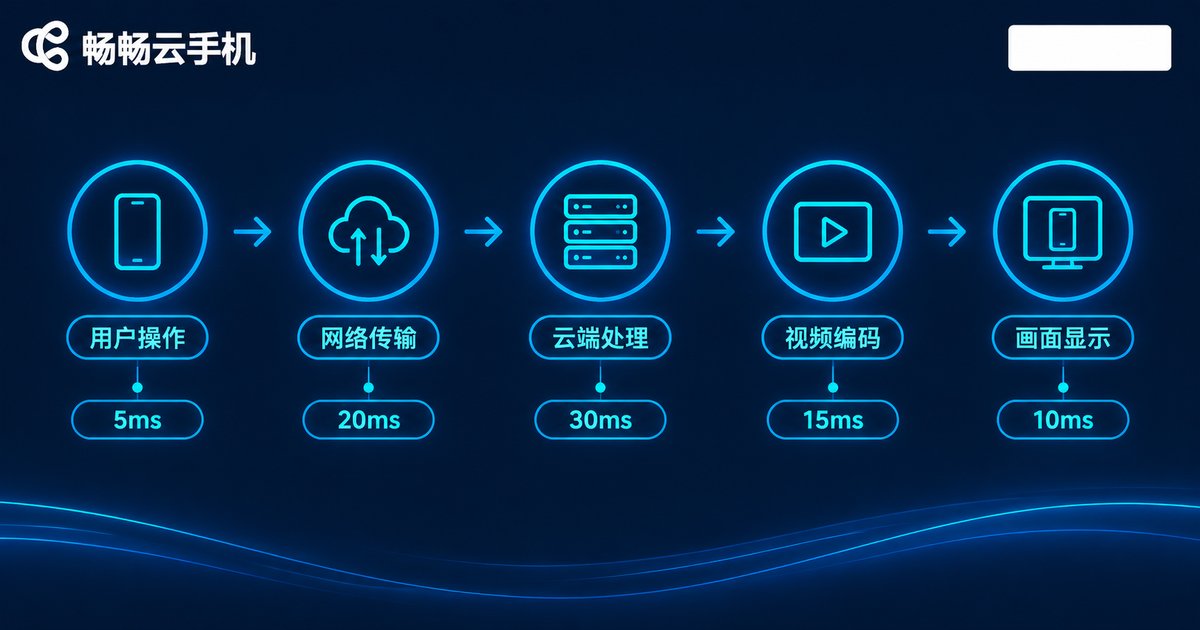
Four Key Factors That Affect Latency
1. Physical distance: the farther you are from the cloud phone data center, the higher the baseline latency. Choosing a nearby node typically saves 20-40ms.
2. Network quality: bandwidth is just the entry ticket — jitter and packet loss are what really ruin responsiveness. A Wi-Fi signal through two walls can double latency fluctuation.
3. Encoding efficiency: the cloud compresses the video and your device decompresses it; the faster this pipeline runs, the sooner frames arrive.
4. Client device performance: an old phone with weak decoding capability adds another dozen milliseconds on top.
How to Push Latency Down
Based on our test experience, here are four tips you can apply immediately:
First, fix your network. Prefer 5GHz Wi-Fi or a wired adapter, stay off the crowded 2.4GHz band, and keep the router in the same room as your streaming device.
Second, pick the right node. When signing up for a cloud phone, always choose the data center nearest to you — this single step often beats every other optimization.
Third, pick the right provider. Services like ChangChang Cloud Phone (ccloudphone) that continuously optimize the streaming pipeline deliver more stable latency in both gaming and idle-farming scenarios. Its Android cloud environment supports multi-instance and idle tasks, so even when the network wobbles, batch jobs rarely get interrupted — a good fit for both gamers and multi-account users.
Fourth, manage your local device. Close bandwidth-hungry background apps such as cloud sync and system updates while streaming, so they do not compete for bandwidth.
FAQ
Q: Is 30ms of cloud phone latency noticeably different from a local phone?
In practice, almost imperceptible. At under 30ms, even latency-sensitive MOBA and FPS play feels nearly native — only professional esports players deliberately comparing side by side might notice.
Q: Can I still play games at 120ms?
It depends on the genre. Idle, turn-based, and card games are fine; but rhythm games and FPS esports become genuinely hard. Optimize your network or switch to a closer node first.
Q: Why does the same cloud phone feel different at night versus daytime?
Evening peak congestion increases jitter and packet loss, making latency fluctuate more. This is inherent to public networks; a provider with strong scheduling like ChangChang Cloud Phone can mitigate it, but not eliminate it entirely.
Q: Mobile data or Wi-Fi — which has lower latency?
A strong 5G signal is sometimes more stable than congested Wi-Fi, and vice versa. Test both and keep whichever fluctuates less.


