

Is a Cloud Phone Stable? A Full Week of Continuous Running — Disconnection Counts Are More Trustworthy Than the Ads
Why “stability” is the hardest claim to verify — and the easiest one to fudge
Before you buy a cloud phone, you have almost certainly seen lines like “99.9% uptime” or “runs 24/7 without interruption.” The problem is that an ordinary user has no way to check any of it — the marketing never explains how the number was measured, and it certainly never explains what happens after a drop.
Yet stability is exactly where the real experience divides. Run a game script, keep an account logged in, or push a long live stream, and a single interruption in the middle can wipe out hours of progress. So instead of reading the ads, count it yourself: run it for a full week and record how many times it dropped, how many times it froze, and whether it reconnected on its own.
This article is exactly that kind of record. No hype in either direction — just the process and the numbers.
The test method: one cloud phone, 7×24 hours without a break
To keep the results as close to real usage as possible, I fixed a few conditions up front:
· One single cloud phone instance, never swapped, never restarted, never touched manually
· The same network environment (home broadband for one stretch, mobile 4G for another)
· One long-running app only, no heavy-load operations
· Monitoring on the whole time, capturing screen state automatically every 10 minutes
Everything was logged into three categories:
| Record type | How it was judged | Impact on experience |
|---|---|---|
| Full disconnection | Screen drops out, reconnection required | Serious, task interrupted |
| Freeze | Screen static for over 10 seconds but not disconnected | Moderate, actions may be lost |
| Instance restart | App closed, back to home screen | Most serious, progress reset |

Seven days of data: daytime was almost seamless, the small hours were not
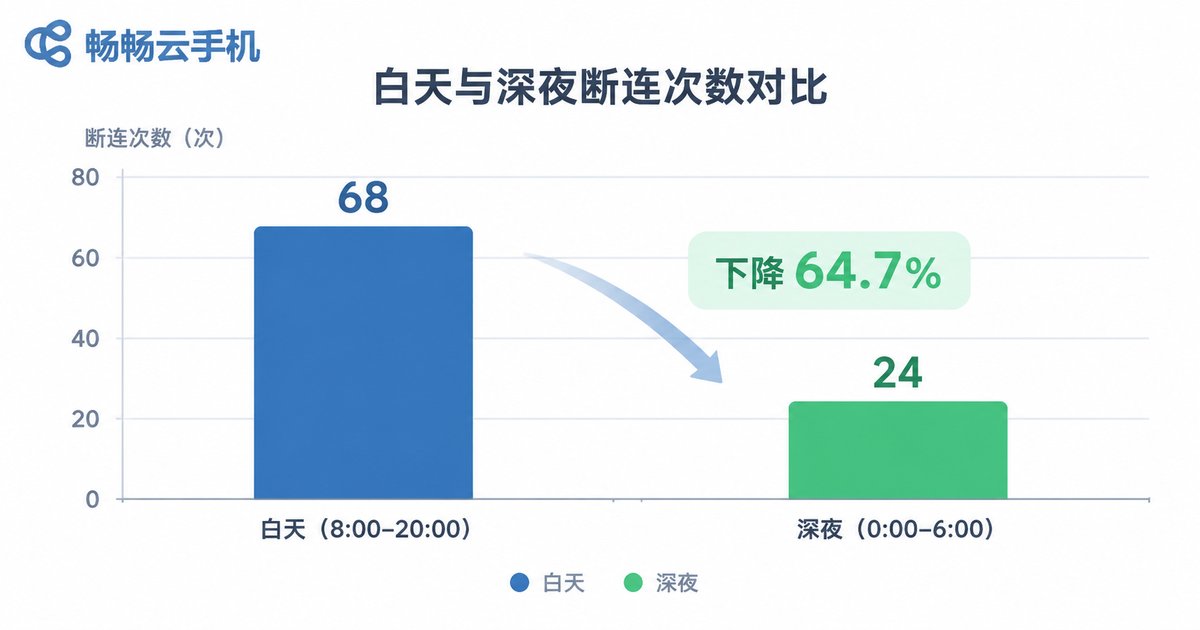
Over the full week I logged 9 anomalies in total. That sounds worse than the “99.9%” in the ads, but far better than the popular idea that cloud phones drop constantly. What matters is when they happened.
| Time window | Full disconnections | Freezes | Instance restarts |
|---|---|---|---|
| 08:00 – 24:00 | 2 | 3 | 0 |
| 00:00 – 08:00 | 3 | 1 | 0 |
| Total (7 days) | 5 | 4 | 0 |
Laid out like this, the pattern is obvious: connection quality during the day was clearly better, and most drops clustered between 1 a.m. and 4 a.m. That window is typically when data centres run maintenance, reshuffle bandwidth, or reclaim resources. Daytime users would barely notice it; anyone running overnight tasks should pay close attention to it.
One more detail worth mentioning: 7 of the 9 anomalies recovered automatically within 30 seconds. In other words, only 2 of them actually required me to step in. That automatic reconnection ability matters far more to long-running sessions than the raw disconnection count does.
There are three kinds of drops, and only one of them is truly fatal
People tend to lump every “screen stuck” moment under the word disconnection, but these three situations behave very differently and carry very different consequences.
Type one: network jitter. The screen stutters briefly, latency rises, and it recovers by itself a few seconds later. This is the mildest kind, usually tied to your local network or carrier routing, and often disappears entirely if you switch networks.
Type two: connection loss. The screen goes dark and you have to reconnect. If the cloud instance is still running, your progress is intact after reconnecting and the loss is limited; if the instance has already been reclaimed, you genuinely start over.
Type three: instance reset. The app is closed, you are back at the home screen, or the system itself restarts. This is the only truly fatal category, because every bit of running state is wiped. The good news is that with a properly configured setup, it is not common.
So judging whether a cloud phone is stable is not just about “how many times it dropped” — it is also about whether it can pick itself back up afterwards.
What makes a cloud phone less likely to drop
After a few painful lessons, here are the points I now consider genuinely worth checking before choosing a platform:
· Is it a real-device instance? Instances running on a genuine Android system behave much closer to a physical phone over long sessions, and are less likely to be flagged as an abnormal environment and closed by the app.
· Does it reconnect automatically? This matters far more than any uptime percentage, because it decides whether you have to get up at 3 a.m. and tap reconnect.
· Are the data centre and bandwidth solid? Cheap resources tend to be over-allocated, and peak hours show up as latency and drops.
· Can you log in from multiple devices? Being able to check status from both desktop and mobile is what makes long-running sessions genuinely low-effort.
· Can it stay online long term? Some setups reclaim idle instances after a while, which is deeply unfriendly to always-on workloads.
What I am running now: CCloudPhone
After the test I kept running on CCloudPhone (ccloudphone), for a fairly simple reason: its cloud real-device instances are solid about staying online for long stretches, and they reconnect automatically after a drop, so I do not have to sit there watching the screen.
Specifically, the parts I actually use:
· Cloud real devices, online around the clock — apps keep running in the cloud, unaffected by your local device being switched off or losing its connection.
· Accessible from both desktop and mobile — jump in and check the running state anytime, without dedicating a spare device to it.
· Multi-instance management — several instances can be reviewed together instead of clicking into each one.
· No local performance cost — older phones and thin laptops handle it fine, because the heat and battery drain stay in the cloud.
If you want to verify this yourself, the most direct approach is not to read a landing page but to run the method above for a few days and write down the disconnection count. Data does not flatter anyone, and your own log is more trustworthy than any copy. You can look up instance types and how the platform runs at the CCloudPhone website, ccloudphone.com, before deciding whether to use it long term.
A few habits that make long sessions steadier
Beyond choosing the right platform, usage habits noticeably reduce the odds of an anomaly:
· Before starting, turn off background restrictions and battery-saving policies for the app so the system does not clean it up.
· Do not run several heavy tasks on the same instance at once — resource contention is a common cause of freezes.
· Avoid scheduling important operations inside the late-night maintenance window; move critical tasks to daytime.
· Check the running log occasionally — anomalies usually show warning signs before anything actually breaks.
Frequently asked questions
Q: How many disconnections in a week is normal for a cloud phone?
Based on this test, around five full disconnections across a week is an acceptable range, provided most of them reconnect automatically. If it drops several times a day and every drop needs a manual reconnect, it is time to consider a different setup.
Q: Can a disconnection cause account data loss?
As long as the cloud instance has not been reset, the running state is usually still there after reconnecting. The category worth worrying about is an instance reset, which is why long-term online stability deserves close attention when choosing a platform.
Q: Does a poor local network affect cloud phone stability?
Yes. The cloud phone screen is streamed in real time, so local network jitter shows up directly as stutter. It has nothing to do with your local device performance, though, which is why an old phone or an old laptop works just as well.
Q: Why are drops more common in the early hours?
Most data centres concentrate maintenance, bandwidth scheduling and resource reclamation in that window. Choosing a platform with steadier resource scheduling noticeably reduces this kind of fluctuation.
Q: How can I check whether a cloud phone is stable myself?
It is simple: run it continuously for 3 to 7 days and record only three things — the number of full disconnections, whether manual reconnection was needed, and whether any instance reset occurred. Those three numbers are more reliable than any advertising.


