
Can Cloud Phones Really Replace Physical Phones? The Truth About Zero Local Resource Usage and Big Games on Budget Devices
What Is a Cloud Phone? Understand How It Works First
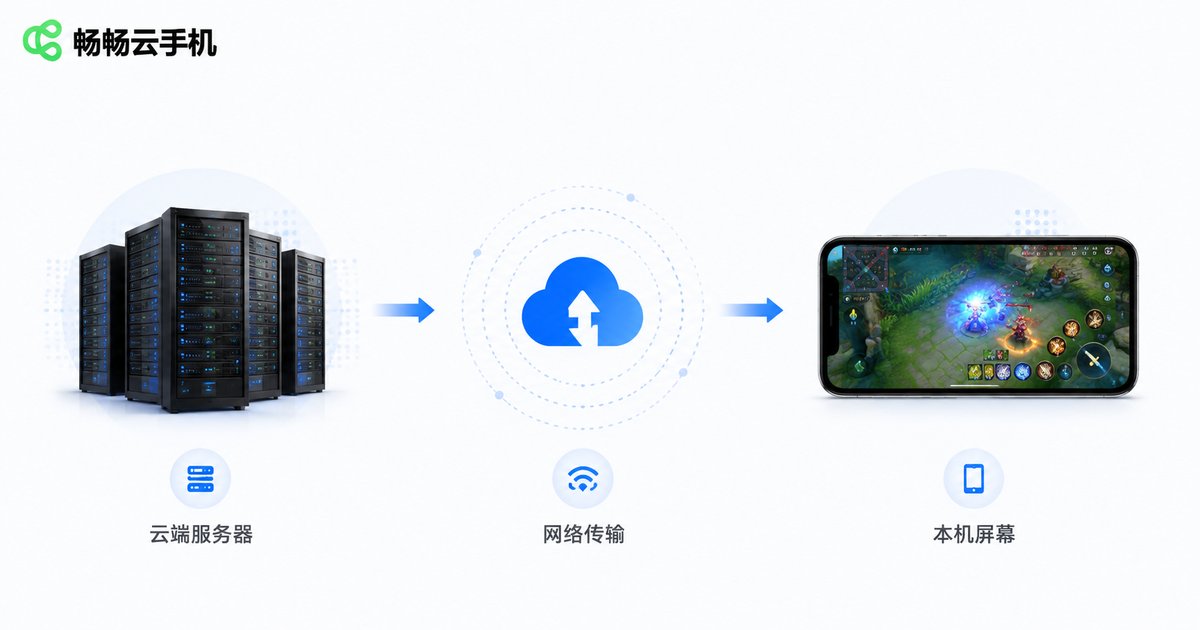
A cloud phone is far more than just an ordinary app on your device. It is essentially a "virtual real device" running in a remote data center. The processor, memory, storage, and operating system all run on servers far away. Your local device does only two things: sends your touch inputs to the cloud and receives the real-time rendered screen back—similar to cloud gaming in experience, but with far broader functionality.
In other words, every frame you see on your screen is not rendered locally, but "live-streamed" from cloud servers.
Is "Zero Local Resource Usage" Real? A Technical Breakdown
The claim is largely true, but it needs proper understanding. When you run a demanding mobile game through a cloud phone:
Your local device handles only two tasks: video decoding and network transmission. Both are extremely light on hardware—even entry-level chips from years ago handle them easily. The truly demanding work—game rendering, physics calculations, AI processing—is all done by cloud servers.
So a more accurate way to put it is: your local device barely participates in computing; it just "watches". That's why your phone doesn't heat up while gaming, and battery drain is comparable to watching videos.
Running Demanding Games on a Budget Phone: What's the Real Experience?
In theory, as long as your budget phone can smoothly play 1080P videos and your network is stable, you can run hardware-intensive mobile games through a cloud phone. The actual experience depends on three factors:
1. Cloud configuration: The game runs on cloud servers, so graphics quality and frame rate are determined by cloud hardware, not your local device.
2. Network quality: This is the most critical factor. With stable Wi-Fi or 4G/5G, the experience is close to local gaming; network fluctuations may cause stuttering.
3. Streaming bitrate: Cloud phones transmit real-time video streams—higher bitrates mean clearer visuals but require more bandwidth.
For idle games, turn-based games, and card games, the cloud phone experience is nearly identical to a real device; for highly competitive games requiring precise inputs, a better network environment is needed.
Cloud Phone vs. Physical Phone: A Comparison Table
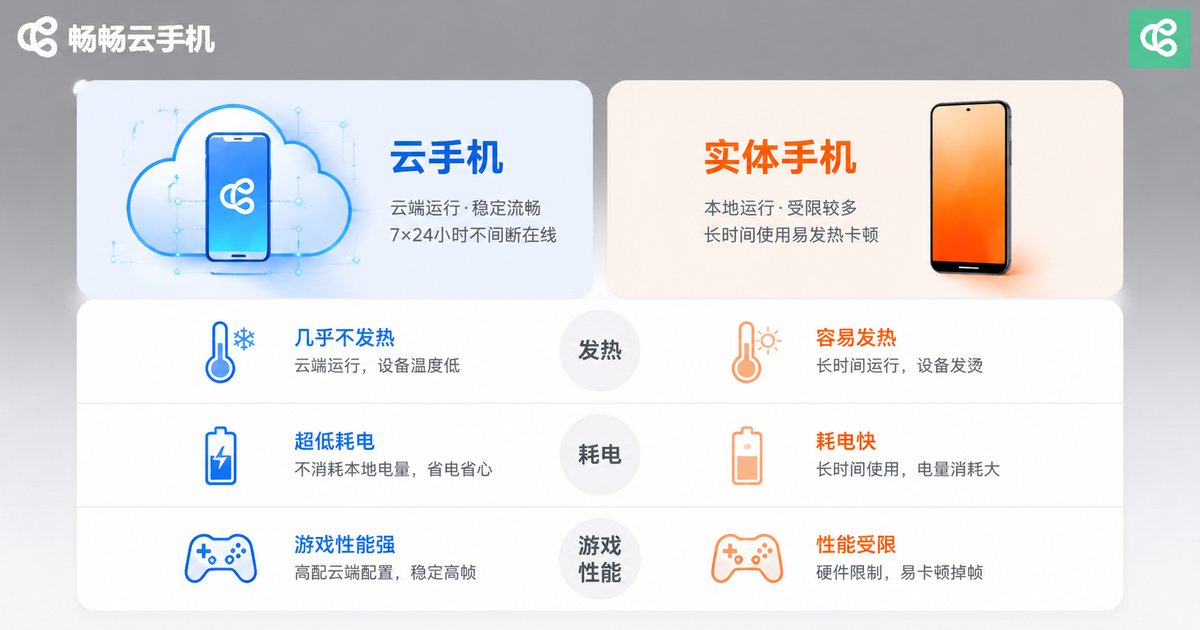
| Dimension | Cloud Phone | Physical Phone |
|---|---|---|
| Local resource usage | Nearly zero | Heavy load |
| Large game performance | Depends on cloud config & network | Depends on local chip |
| Heat & battery | No heat, minimal drain | Heats up, drains fast |
| 24/7 online | Supported, runs in cloud | Impractical |
| Multi-instance | Manage multiple cloud phones | Limited by hardware |
| Camera/QR/payment | Not supported | Fully supported |
| Network dependency | Strong—offline means disconnected | Weak—most features work offline |
Honestly: Where Cloud Phones Can't Replace Physical Phones Yet
Cloud phones are powerful, but not omnipotent. These scenarios still require a physical phone:
Cameras and sensors: Photography, QR code payments, NFC access, fingerprint recognition—features depending on local hardware that cloud phones cannot replicate.
Ultra-low latency scenarios: Situations demanding instant feedback cannot fully eliminate the slight delay from network transmission.
Weak network environments: Subways, elevators, and remote areas with unstable networks will significantly degrade the cloud phone experience.
So the more reasonable positioning is: a cloud phone is a "computing booster" and "second phone" for your physical device, not a complete replacement.
Who Benefits Most from Cloud Phones?
Mobile gamers: Players who want to enjoy high-quality games on budget devices, or need long idle-farming sessions.
Multi-account users: Managing multiple game or social accounts—one cloud phone per account, without interference.
App developers and testers: Deploying batch testing environments in the cloud without purchasing numerous real devices.
Old phone owners: Aging, laggy phones can "fight on for years" with a cloud phone.
Why We Recommend ChangChang Cloud Phone (ccloudphone)
Among cloud phone products, ChangChang Cloud Phone (ccloudphone) is a solid choice worth considering. It provides a real-device environment running on cloud servers, supports stable operation of mainstream mobile games and apps, and suits various needs including game idling, multi-account management, and app testing. Check the official website for specific plans and pricing, and choose the option that fits you best.
FAQ
Q: Do I need to download games to my local device for a cloud phone?
No. Games are installed on cloud servers, taking up zero local storage—one aspect of "zero local resource usage".
Q: Can I use a cloud phone with a poor network?
Network quality is key to the cloud phone experience. Stable Wi-Fi or 4G/5G is recommended; fluctuations may cause stuttering.
Q: Do budget phones really run smoothly with cloud phones?
Your local device only handles screen streaming—computing happens in the cloud—so local performance matters little. Smoothness mainly depends on network quality and cloud configuration.
Q: Is my data safe on a cloud phone?
Data is stored on cloud servers. Choosing a reputable provider is important, and adding security protection to important accounts is recommended.
Q: Can cloud phones completely replace physical phones?
Not yet. Features relying on local hardware like cameras and payments still need a physical phone, but for gaming, app running, and multi-instance management, cloud phones already offer near-real-device experiences.


