
How Much Traffic Does a Cloud Phone Consume in a Month? First Public Test Data
Background of Cloud Phone Idling Traffic Test
With the popularity of cloud phones, more and more users are using them for game idling, app check-ins, and other operations. However, many users have doubts about the traffic consumption during cloud phone idling. This article will use test data to analyze in detail how much traffic a cloud phone consumes in a month of idling, and the corresponding cost.
Traffic Consumption Comparison in Different Idling Scenarios
We conducted a one-week test on several common idling scenarios and calculated the monthly (30 days) traffic consumption. The test environment was based on the standard configuration of ccloudphone, under a stable Wi-Fi network.
| Idling Scenario | Hourly Traffic | Daily Traffic (24h) | Monthly Traffic (30d) |
|---|---|---|---|
| Text Game Idling | ~ 5 MB | ~ 120 MB | ~ 3.6 GB |
| 2D Mobile Game Light Idling | ~ 15 MB | ~ 360 MB | ~ 10.8 GB |
| 3D Mobile Game Heavy Idling | ~ 40 MB | ~ 960 MB | ~ 28.8 GB |
| App Auto Check-in/Reading | ~ 3 MB | ~ 72 MB | ~ 2.1 GB |
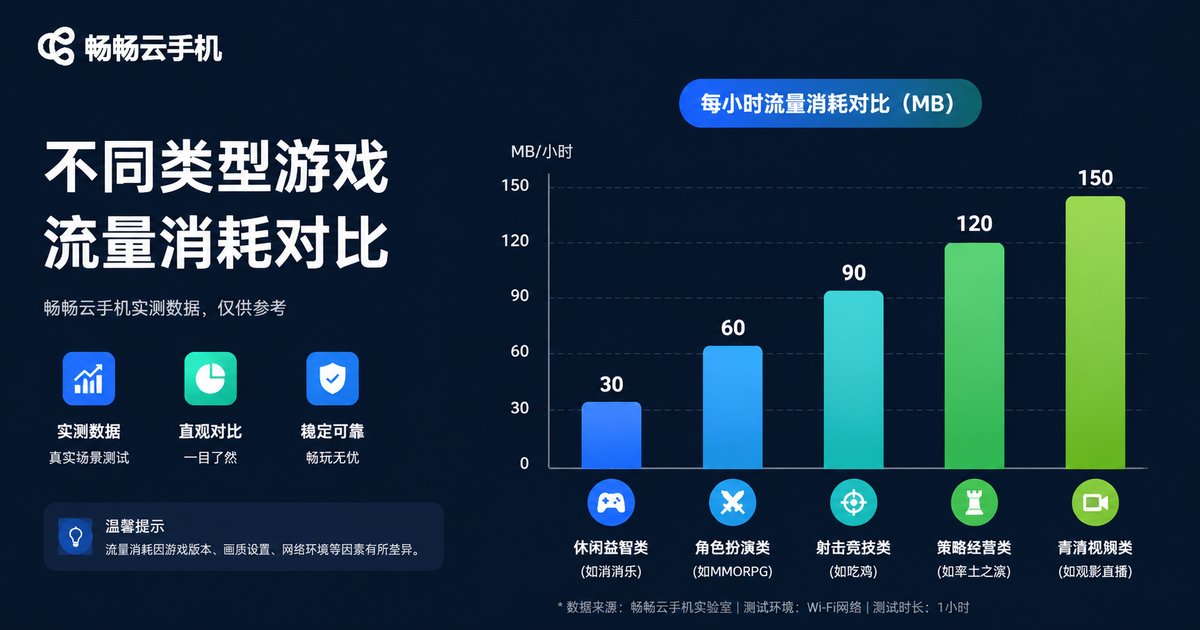
From the data, it can be seen that the complexity of the idling scenario directly determines traffic consumption. 3D heavy games consume significantly more traffic than text games due to the need to transmit more real-time image data.
Key Factors Affecting Cloud Phone Traffic Consumption
In addition to the type of idling, several key factors affect your traffic usage:
1. Image Quality Settings: The higher the image quality provided by the cloud phone, the larger the transmitted data. For scenarios that only require idling, appropriately lowering the image quality can save a lot of traffic.
2. Frame Rate (FPS): The higher the frame rate, the smoother the picture, but the traffic consumption also increases proportionally. Idling usually does not require a high frame rate; setting it to a low frame rate mode is sufficient.
3. Background Running Status: Even if the screen is off, the cloud phone is still running on the server. If the app itself has a lot of background data interaction (such as frequently refreshing leaderboards), traffic consumption will also increase.
Practical Traffic-Saving Tips for ccloudphone
When using ccloudphone for idling, you can effectively reduce traffic consumption through the following settings:
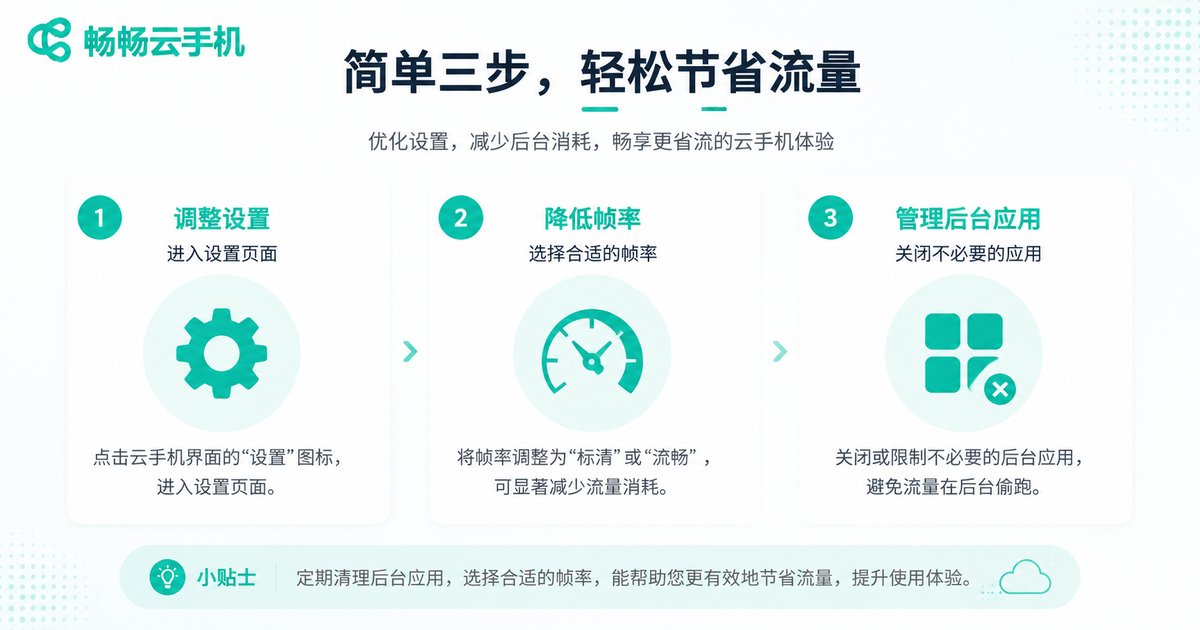
Enable Traffic-Saving Mode: In the ccloudphone settings, select the "Smooth/Traffic-Saving" image quality. The system will automatically compress the transmitted data, saving traffic without affecting the core functions of idling.
Adjust Frame Rate: Set the frame rate to 15-20 FPS, which is enough to meet most idling needs.
Close Unnecessary Background Apps: Keep only the apps that need to be idle running, and close other background programs to reduce unnecessary data transmission.
Monthly Cost Calculation for Cloud Phone Idling
Now that we understand the traffic consumption, let's look at the cost. Assuming you use a mobile data network for idling (although Wi-Fi is recommended, some scenarios may require mobile networks), calculated at the current common traffic package prices:
Taking the monthly demand of 10GB traffic (2D mobile game light idling) as an example, the price of a 10GB traffic package from most carriers is around $3-$5. This means that if you use ccloudphone for idling, the extra monthly traffic cost is actually very low. If you use Wi-Fi, the cost is almost zero.

FAQ
Q: Must the cloud phone keep a network connection while idling?
A: Yes, the cloud phone itself runs on a cloud server. Your device needs to keep a network connection to receive images and send commands. If the network is disconnected, the cloud phone will continue to run on the server side, but you cannot view the screen or perform operations.
Q: Does using ccloudphone for idling consume local device battery?
A: Compared to running games locally, cloud phone idling consumes very little battery on the local device because the main computing and rendering are done in the cloud, and the local device is essentially just playing a video stream.
Q: What if the traffic is not enough?
A: It is recommended to use a cloud phone for idling in a Wi-Fi environment. If you must use mobile data, please refer to the traffic-saving tips above, or choose an idling scenario with lower traffic consumption.


