

How to Build a Cloud Phone Group Control System: A From-Scratch Multi-Device Management Tutorial
What Is a Cloud Phone Group Control System?
A cloud phone group control system, in simple terms, means managing multiple cloud phones at the same time from a single control panel. Every cloud phone runs on a cloud server with its own independent Android environment. There is no need to buy physical phones or deal with messy cables — an ordinary computer is enough to batch-operate dozens or even hundreds of devices.
Compared with a traditional physical phone farm, cloud phone group control offers obvious advantages: no hardware investment, full remote operation, and flexible scaling at any time. Whether it is app testing, multi-account operation, or batch content publishing, efficiency can multiply.

Three Things to Prepare Before Building
Before you start, get these three things clear to avoid detours:
First, define your use case. Are you running multi-instance app testing, a short-video account matrix, or multi-account game idle farming? Different scenarios require very different device counts and configurations. Start small to validate the workflow, then scale up gradually.
Second, estimate your device count. The value of group control lies in scale, but more devices mean higher costs and management complexity. Beginners should start with 5 to 10 devices and expand after the results are proven.
Third, secure a stable network. Cloud phones run in the cloud, but your controlling computer still needs a reliable connection to avoid frequent disconnections during batch operations.
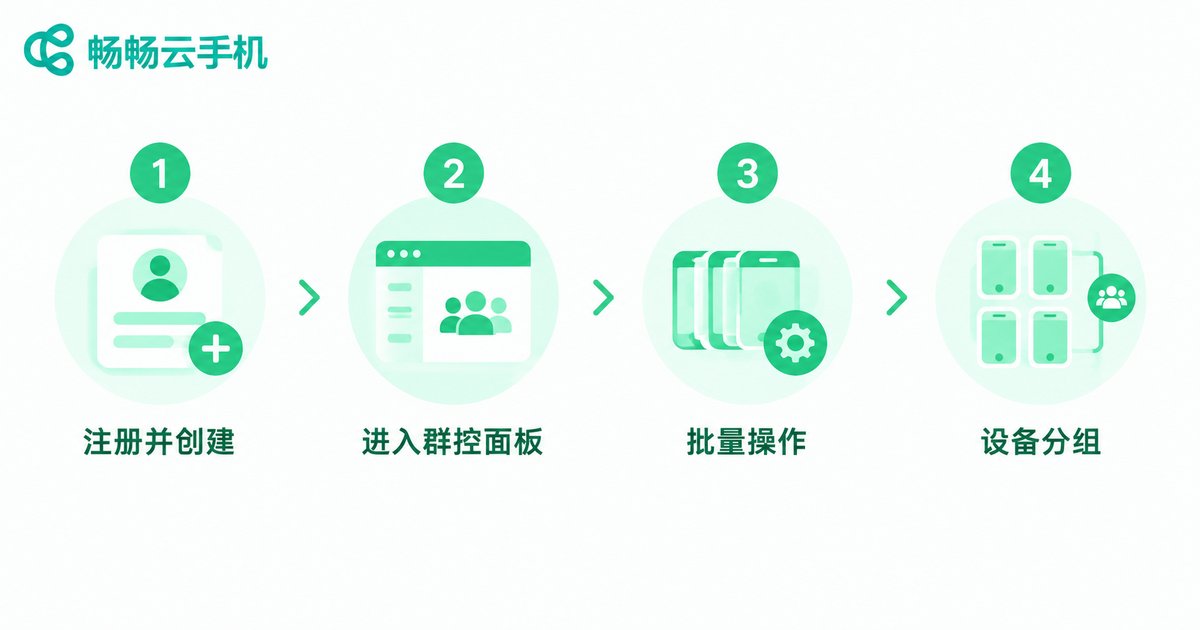
Build the System in Four Steps
Here we use ChangChang Cloud Phone (ccloudphone) as an example to walk through the complete setup process from scratch. No coding is required — everything can be done with a few clicks.
Step 1: Register and create cloud phones. Sign up on the ChangChang Cloud Phone official website, choose a suitable configuration for your business, and create device instances in batch. You can select multiple devices at once, and the system automatically assigns an independent Android environment to each one.
Step 2: Enter the group control panel. Select the cloud phones you want to manage together in the device list and switch to group control mode. All selected devices appear as thumbnails on the operation panel, so you can monitor the status of each device in real time.
Step 3: Execute batch operations. In group control mode, you can perform batch app installation, synchronized taps and swipes, batch file transfer, one-click cleanup and more. Actions taken on the master device are mirrored across all other devices.
Step 4: Organize devices into groups. Once your device count grows, divide cloud phones into groups by purpose — for example, Group A for testing and Group B for operations. Different groups can run different tasks without interfering with each other.
Physical Phone Farm vs. Cloud Phone Group Control
Many people hesitate before building a group control system: should they buy a pile of physical phones or go straight to cloud phones? This table helps you compare quickly:
| Dimension | Physical Phone Farm | Cloud Phone Group Control |
|---|---|---|
| Hardware cost | Phones, stands and hubs required | Zero hardware, activate on demand |
| Deployment | Wiring and debugging, often days | Ready in minutes after sign-up |
| Scaling | Repurchase equipment | Add devices online anytime |
| Maintenance | Lag and damage handled manually | Maintained centrally in the cloud |
| Remote work | Must be on site | Manageable anywhere with internet |
Daily Management Tips and Pitfalls to Avoid
Building the system is only the first step — long-term stability depends on daily management. Here are some practical tips:
Tip 1: Clean devices regularly. Long-running cloud phones accumulate cache. Run a batch cleanup once a week to keep devices smooth.
Tip 2: Stagger batch tasks. Avoid operating hundreds of devices simultaneously during peak hours. Execute in smaller batches for better stability.
Tip 3: Keep device-account records. Use a spreadsheet to track which cloud phone maps to which business and account, so issues can be located quickly.
Tip 4: Follow official updates. ChangChang Cloud Phone keeps optimizing its group control experience; updating the client ensures better batch performance.
FAQ
Q: Do I need programming skills to build a cloud phone group control system?
No. Platforms like ChangChang Cloud Phone provide a graphical group control interface — just select devices and click to operate. Zero code needed.
Q: How many cloud phones can one computer control?
There is no hard limit; it mainly depends on your bandwidth and business needs. Start with a small number of devices and scale up gradually to find the scale that suits you best.
Q: Will cloud phone group control be laggy?
Lag is usually related to the local network. Cloud phones run in cloud data centers, so batch operations stay smooth as long as your connection is stable. A wired network or reliable Wi-Fi is recommended.
Q: Can multiple cloud phones run the same app at the same time?
Yes. Each cloud phone is an independent Android environment with isolated app data — exactly why cloud phone group control is widely used for multi-account operation.
Q: How is data security handled?
Cloud phone data is stored on cloud servers. Back up important files before releasing a device, and avoid storing sensitive personal information inside cloud phones.


