

Cloud Phone Farming Guide: Multi-Instance Setup, Task Scheduling and Cost Control
What Cloud Phone Farming Really Is
Farming is essentially trading a standardized workflow for steady output: account registration, daily check-ins, task claiming, resource collection. None of those steps is difficult on its own. What is difficult is keeping everything under control once you scale. With physical phones you deal with electricity bills, heat, swollen batteries, unstable Wi-Fi and a pile of charging cables you can never untangle. With cloud phones the devices run in a data center, so as long as you have an internet connection you can manage dozens of them from a single screen on your laptop or phone.
This guide skips the theory and follows the practical order: first get the multi-instance configuration right, then get task scheduling under control, then keep costs in check.
Step One: How to Set Up Multiple Instances
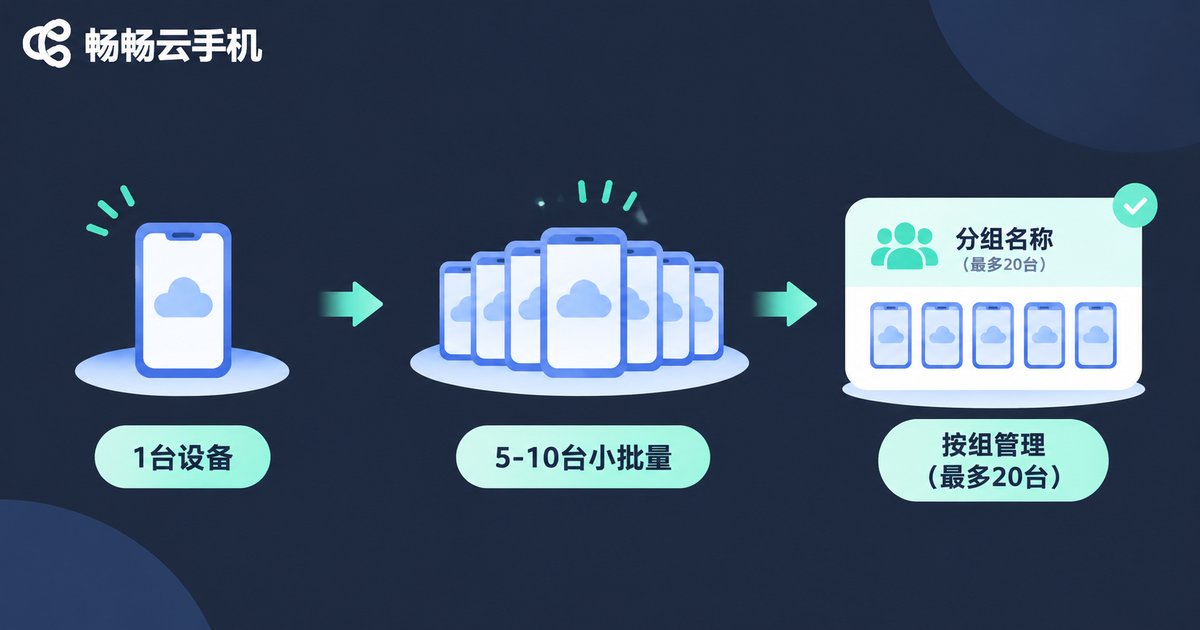
The most common beginner mistake is trying to do everything at once, opening dozens of devices on day one and ending up with total chaos and no way to diagnose anything. Scale up in stages instead.
1. Get one instance working end to end. Complete the full cycle on a single device: log in, verify, claim tasks, settle rewards. If one instance cannot finish the loop, running forty of them only multiplies the error.
2. Validate with a small batch. Copy the setup to 5 to 10 devices and run it for three to five days. This stage is about stability: do devices drop offline, do they get stuck on a page, does the task completion rate hold steady.
3. Expand in named groups. Once the small batch is stable, grow group by group, keeping each group to around 20 devices and giving every group a clear name (group name plus index) so you can locate problems fast.
| Setting | Recommended approach | What to watch out for |
|---|---|---|
| Device specs | Match the task workload, no more | Over-speccing wastes money, under-speccing gets stuck on loading screens |
| Naming | One fixed format: group name plus serial number | Messy naming is the biggest obstacle to troubleshooting later |
| System environment | Keep every device in a group identical | Mixed versions make the same task behave inconsistently |
| Network setup | Keep a consistent connection per group | Constant switching tends to trigger extra verification |
| How many to boot | Boot in batches based on workload | Booting everything means paying around the clock with no output gain |
Step Two: Scheduling Tasks So Nothing Collides
Most multi-instance failures are not caused by weak devices, they are caused by tasks colliding. When every device tries to claim the same task at the same second, you get mass failure. Two habits, batching and staggering, prevent most of it.
Start in waves. Split devices into three or four groups and launch them a few minutes apart. This avoids a burst of simultaneous load and lets you tell immediately which batch a problem came from.
Stagger execution. Separate long tasks from short ones. Check-ins and claims that take under a minute go in one window; long-running idle tasks go in another, so they do not interrupt each other.
Reserve time for inspection. Pick two fixed times per day to check device status: online rate, pages that are stuck, devices that exited unexpectedly. Fix problems on the spot instead of letting them pile up.
Design for exceptions, not against them. Any batch process leaves some devices behind. Rather than chasing zero failures, prepare a reliable re-run routine so the workflow absorbs small hiccups on its own.
Step Three: Cost Control, Where the Real Margin Comes From
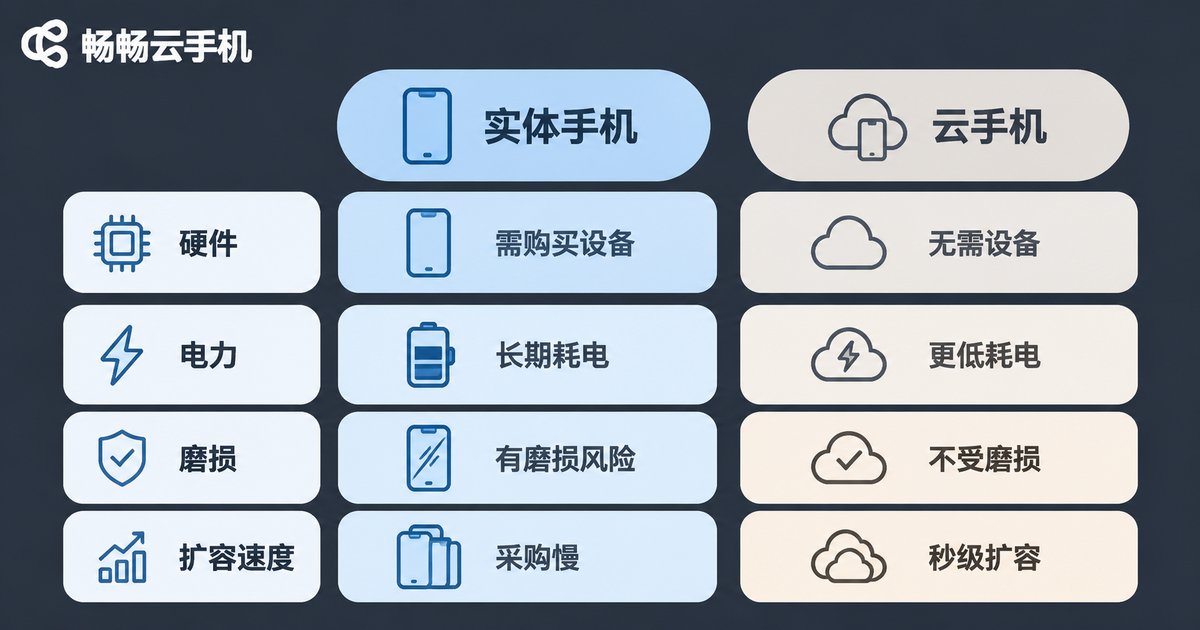
You have to run the numbers twice: once for income, once for cost. Many people watch only income and discover a month later that after device costs and their own time, very little is left. These four actions cost the least and pay back fastest.
1. Boot on demand. If tasks only run during the day, do not leave devices on overnight. Every idle minute is pure expense.
2. Screen devices by output. Review actual output per device once a week. Any device that consistently underperforms gets retired and its budget goes to the ones that produce.
3. Expand in small increments. Trial new batches at low volume first. Only add more once output is confirmed to cover the cost.
4. Count your own time. Managing 10 devices and managing 50 do not take the same effort. If a configuration doubles your daily maintenance time, a cheaper per-device price still leaves you worse off overall.
| Cost item | Traditional physical phones | Cloud phone setup |
|---|---|---|
| Hardware | Buy multiple devices upfront | No hardware purchase, subscribe as needed |
| Power and cooling | Always plugged in, ongoing electricity and heat | Devices run in the cloud, almost no local overhead |
| Wear and tear | Battery aging and screen burn, periodic replacement | No local hardware wear |
| Scaling speed | Order, ship, configure, long lead time | Add devices in minutes |
| Management | One device at a time, limited physical space | One dashboard for batch control, remote access anywhere |
Why Use ccloudphone for Batch Management

Once your instance count grows, tooling stability becomes productivity. ccloudphone runs devices in the cloud so your local machine only handles display and input. That solves three practical pain points:
Manage from anywhere. Connect to cloud devices from a laptop or a phone, so you can check online rates while commuting or travelling instead of sitting at a desk.
Batch operations without the busywork. Multiple devices sit in one interface, so power control, status checks and group management can be handled in batches. Management time stops growing in lockstep with device count.
Flexible specifications. Different tasks need different specs. Choose the right configuration per batch and spend resources where they are actually needed instead of paying top specs for every instance.
A sensible approach: prove the workflow on one instance and a small batch with ccloudphone, confirm the output is predictable, and only then scale out by group.
Frequently Asked Questions
Q: How many devices should a beginner start with?
Start with one, complete the full workflow, then move to 5 to 10 devices to validate stability. Run that for a few days before expanding. Moving too fast makes it impossible to tell whether a problem comes from the workflow or the device.
Q: Do more devices always mean more output?
No. Output depends on workflow efficiency and management precision. Once you have more devices than you can supervise, offline devices, stuck tasks and missed settlements eat up the gains. Stabilize per-device output first, then talk about volume.
Q: Tasks always fail at the same moment. What causes it?
Usually every device performs the same action at the same time. Split devices into batches and stagger execution by a few minutes, and most of those mass failures disappear.
Q: How do I decide whether to keep a device running?
Look at output ratio. If a device sits clearly below average for a full week, check its task configuration first, and if that is fine, retire it and move the budget to a more reliable spec.
Q: If my local internet drops, do cloud tasks stop?
Cloud devices run independently in the data center. Losing your local connection only means you cannot see the screen; tasks already running continue. Reconnect and log back in to check status.
Q: How often should I review the whole setup?
Once a week. Check three numbers: online rate, task completion rate, and output per device. If all three are stable, consider expanding. If one is off, fix that first.


