

Will a Cloud Phone Be Destroyed Immediately When It Expires? Interpretation of Data Retention Rules During the Grace Period
Will a Cloud Phone Be Destroyed Immediately When It Expires?
Many users worry that their apps, data, and configurations will disappear the moment their cloud phone subscription expires. In reality, reputable cloud phone providers usually do not destroy the environment at the exact moment of expiration. Instead, they offer a grace period that gives users time to renew or back up their data. This article explains the data retention rules after expiration to help you avoid unnecessary loss.
What Does "Cloud Phone Expiration" Mean?
A cloud phone is a mobile service running in a cloud virtual environment, accessed remotely via a client. Subscriptions are typically billed in cycles, such as monthly or yearly. Expiration refers to the state when the subscription period ends and no renewal has been made.
What Happens After Expiration? The Grace Period Is Key
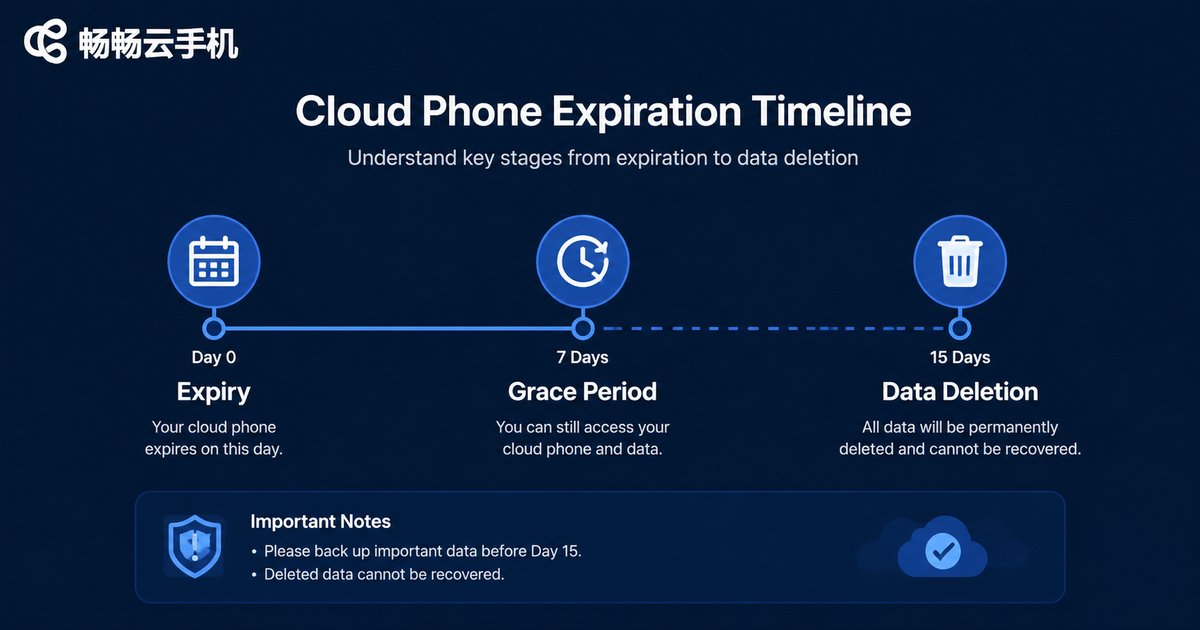
Most cloud phone providers do not immediately destroy the environment. Instead, they enter a grace period. During this period, your data remains fully intact, but you may not be able to use the service or access may be restricted. After the grace period ends, if you still haven't renewed, the environment may be destroyed or reclaimed.
Detailed Data Retention Rules During the Grace Period
| Stage | Data Status | User Action |
|---|---|---|
| Expiration day | Data intact, service paused | Receive reminder, renew or back up |
| Grace period (usually 7-15 days) | Data retained, but service unavailable | Renew to restore, or export data |
| After grace period | Data may be deleted or destroyed | Cannot be recovered, act in advance |
Note that the length of the grace period varies by provider. Always check the official policy. For example, ccloudphone sends multiple reminders before expiration and offers a reasonable grace period to ensure users have enough time to handle their data.
How to Avoid Data Loss?
1. Set renewal reminders: Record the expiration date in your calendar or notes.
2. Back up regularly: Export important data to local storage or cloud drives.
3. Enable auto-renewal: If supported, auto-renewal saves you from missing deadlines.
4. Contact support early: If you have special circumstances, you can request a grace period extension.
Why Choose ccloudphone?
ccloudphone prioritizes user experience and excels in data security. They provide transparent expiration rules, and users can view detailed grace period policies on the official website. Additionally, ccloudphone's customer support is responsive and can help you resolve any expiration-related issues.
Frequently Asked Questions
Q: Will my data be deleted immediately after expiration?
A: No. There is usually a grace period during which data is retained but the service is paused.
Q: How long is the grace period?
A: It varies by provider. ccloudphone generally offers 7-15 days; check the official announcement for specifics.
Q: Can I export data during the grace period?
A: Yes. Most cloud phone admin consoles provide data export functionality. We recommend backing up as soon as possible.
Q: Can I recover data after the grace period ends?
A: In most cases, no. So be sure to act during the grace period.


