
Can Cloud Phones Make Calls Without a SIM Card? A Guide to Cloud Device Communication
The Short Answer: No SIM Card, But Calls Still Work
Many people new to cloud phones ask: can a cloud phone make calls without a SIM card? The answer: a cloud phone indeed has no physical SIM card, so it cannot place traditional cellular calls through a carrier's network. But that does not mean calling is impossible—cloud phones come with full internet connectivity. Simply install messaging apps like WeChat or QQ, or any internet calling application, and you can enjoy clear voice and video calls for everyday communication without any impact.
Why Don't Cloud Phones Have SIM Cards?
To understand this, you first need to grasp what a cloud phone really is. A cloud phone is not a physical device you hold in your hand—it is a virtual Android phone running on servers inside a cloud data center. Your own phone, tablet, or computer acts as a remote control, letting you view and operate this cloud-based device in real time over the network.
Since the cloud phone itself lives inside a data center, it naturally has no SIM card slot and cannot accept a physical SIM card. All of its network activity goes through the data center's high-speed internet connection—which is also why cloud phones can stay online 24/7 without draining your local battery.
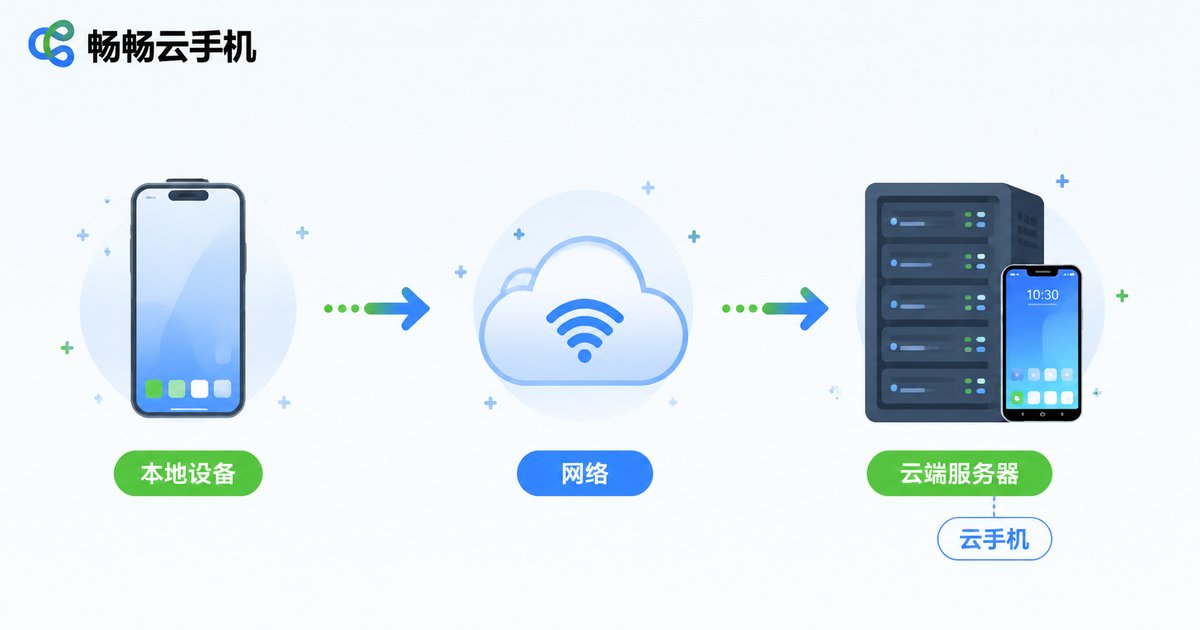
A Full Breakdown of Cloud Device Communication
Even without a SIM card, a cloud phone's networking capabilities are far from weak. Let's break it down item by item:
1. Voice and Video Calls over the Internet
Cloud phones have complete internet access. You can install messaging apps such as WeChat, QQ, or DingTalk and use their voice and video call features to communicate with friends and clients in real time, with clear audio and stable connections—an experience identical to a real device.
2. The Right Way to Handle SMS Verification Codes
A cloud phone has no phone number of its own, so it cannot receive carrier text messages directly. The recommended approach: complete app registration and verification on your local device first, then sign in on the cloud phone. Many apps also support email-based verification, which is equally convenient.
3. Parallel Communication Across Multiple Accounts
For users managing multiple accounts, cloud phones are an excellent tool. Each cloud phone is an independent device environment, allowing different communication accounts to be online simultaneously without interfering with each other—multiplying your communication efficiency.
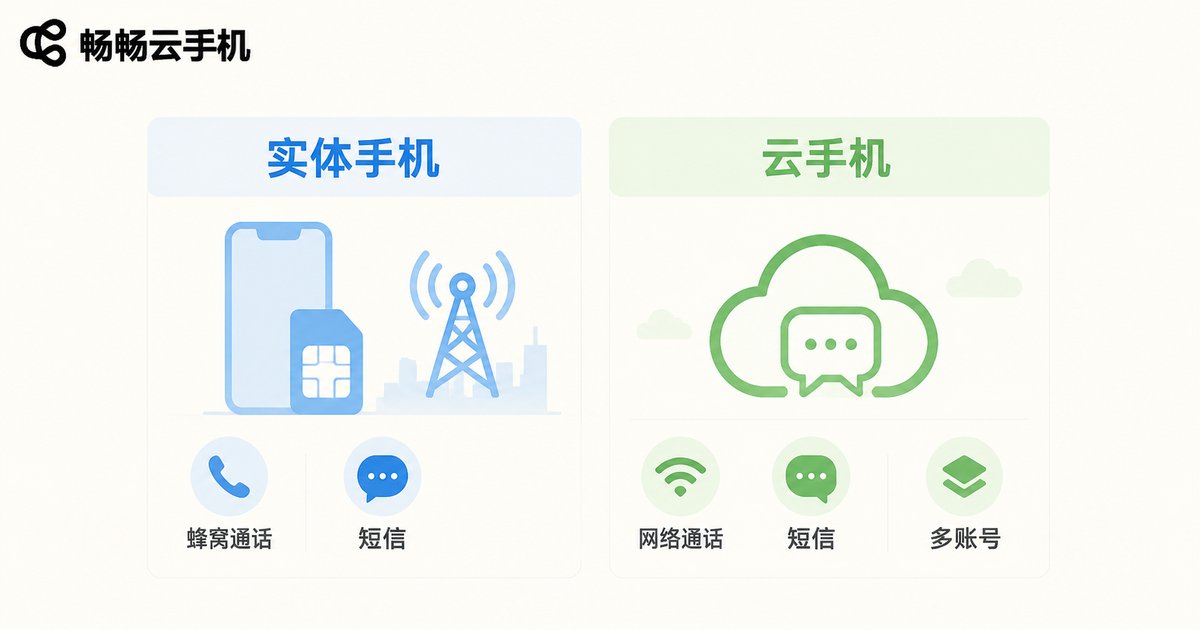
Physical Phone vs. Cloud Phone: Communication Compared
| Capability | Physical Phone | Cloud Phone |
|---|---|---|
| Carrier cellular calls | Yes (requires SIM) | No |
| Internet voice/video calls | Yes | Yes |
| Messaging apps | Yes | Yes |
| Receiving carrier SMS | Yes | No |
| Parallel multi-account | Limited by device count | Scale freely with more cloud phones |
| 24/7 online | Drains battery and data | Always on in the cloud |
As the table shows, cloud phones are fully identical to real devices at the network communication level; the only difference lies in carrier cellular service. When it comes to multi-account scaling and staying online continuously, cloud phones actually hold the advantage.
How to Make Calls on a Cloud Phone in Three Steps
Step 1: Open the app store or browser on your cloud phone and download the communication app you need. Step 2: Sign in with an existing account (it is best to complete registration and verification on a real device beforehand). Step 3: Start a voice or video call directly. The whole process is identical to operating a real phone, with zero learning curve.
Choose ChangChang Cloud Phone for a Worry-Free Communication Experience
If you are shopping for a cloud phone service, ChangChang Cloud Phone (ccloudphone) is worth a try. Running on cloud servers, it delivers stable network connections and smooth app performance, with support for managing multiple cloud phones in one place. Whether for daily communication, account operations, or long-term keep-online tasks, it provides a reliable networking experience. Visit the official ccloudphone website to learn more about the product.
FAQ
Q: Can I insert a SIM card into a cloud phone?
No. A cloud phone is a virtual device running on cloud servers. It has no physical card slot; all communication happens over the internet.
Q: Can a cloud phone receive SMS verification codes?
Cloud phones have no phone number and cannot receive carrier text messages. We recommend registering accounts on your local device first, then signing in on the cloud phone.
Q: Do internet calls on a cloud phone cost extra?
Calls through messaging apps only consume network traffic, and a cloud phone's traffic is carried by cloud servers, so it will not use your local device's data.
Q: How is the call quality on cloud phones?
Cloud phones are hosted in data centers with ample bandwidth, so voice and video calls through apps are typically clear and stable.
Q: How many communication accounts can one cloud phone hold?
One cloud phone equals one independent device and can hold one primary account. To run multiple accounts in parallel, simply use several cloud phones at once.


