

Which Device Scenarios Suit Cloud Phone Batch Group Control? Unified Grouping Strategy Explained
First, Understand: What Exactly Is Cloud Phone Batch Group Control?
In simple terms, a cloud phone is an Android phone running on cloud servers — it consumes none of your local device's storage or battery. Batch group control means managing and operating dozens or even hundreds of cloud phones simultaneously from a single console: batch-installing apps, batch-tapping, batch-publishing content, batch-running tasks. One computer commands an entire “phone army.”
It sounds all-powerful, but group control isn't worth it for every business. Its real value is turning repetitive multi-device operations into one-time setup and one-click execution. To decide whether your scenario fits, check two things: are the operations highly repetitive, and have your devices reached a meaningful scale?
Six Device Scenarios Best Suited to Batch Group Control
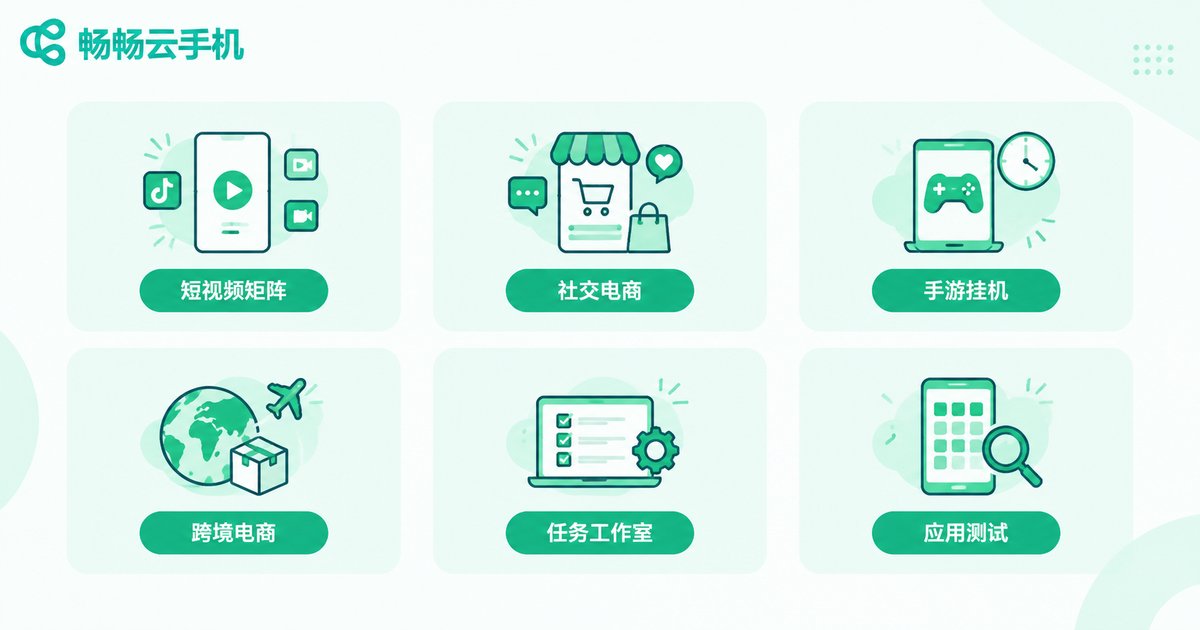
1. Short Video Matrix Operations
A team running a dozen or twenty short-video accounts needs daily publishing, account warming, and comment engagement. With cloud phone group control, accounts on the same platform go into one group for batch publishing, staggered updates, and unified engagement — multiplying team efficiency several times over.
2. Social Commerce and Private Domain Operations
Multiple accounts handle customer reception, community maintenance, and content updates. After grouping, the support group, content group, and campaign group each operate in batches, keeping reply rhythm and material publishing consistent and organized.
3. Mobile Game Multi-Running and Game Studios
Idle farming, daily quests, and multi-character coordination are the classic cloud phone scenario. Cloud phones stay online in the cloud 24/7, drain none of your own battery, and don't drop when your local network does. Paired with batch task dispatch, efficiency far exceeds stacking physical phones on a desk.
4. Cross-Border E-Commerce and Overseas Social Media
Overseas platform operations often mean posting across time zones. Cloud phones support scheduled tasks — set it at midnight, it posts automatically in the morning. Grouping by region or line lets accounts in different markets run independently with clean environment isolation.
5. App Trial-Play and Task Studios
Tasks like app trials, check-ins, and referral campaigns are high-volume, fixed-step, and highly repetitive — group control's home turf. Operate one “master device” and the rest follow in sync; tasks run like an assembly line.
6. App Testing and Compatibility Verification
Developers need to verify app compatibility across many “phones.” Cloud phones spin up different environments quickly, with batch installation, batch launching, and unified result review — far cheaper than buying a pile of real devices.
Here's a quick-reference table:
| Scenario | Typical Scale | Core Group-Control Need | Grouping Suggestion |
|---|---|---|---|
| Short video matrix | 10–50 phones | Batch publishing, staggered warming | By platform |
| Private domain ops | 10–30 phones | Unified messaging, synced materials | By function |
| Mobile game idling | 20–100 phones | Long uptime, scheduled tasks | By game/character |
| Cross-border social | 10–40 phones | Scheduled posting, regional isolation | By region/line |
| Task studios | 30–100 phones | Synced operations, batch scripts | By task type |
| App testing | 5–20 phones | Multi-environment batch deployment | By device model/OS |
Scenarios That Don't Really Need Group Control
To be objective, batch group control isn't a master key. The following businesses gain little from it:
1. Hardware-dependent services: features requiring a real camera, Bluetooth, NFC, or a physical SIM card can't be replaced by cloud phones.
2. High-FPS PC games: cloud phones are Android environments; desktop games simply won't run.
3. Live streaming with real hosts: strongly real-time, human-centric scenarios gain nothing from synced operations.
4. Fine-grained single-account operation: if you run only one or two accounts, careful manual operation is more stable — don't go “batch” for batch's sake.
Unified Grouping Strategy Explained: Dozens of Phones Without Grouping Is a Disaster
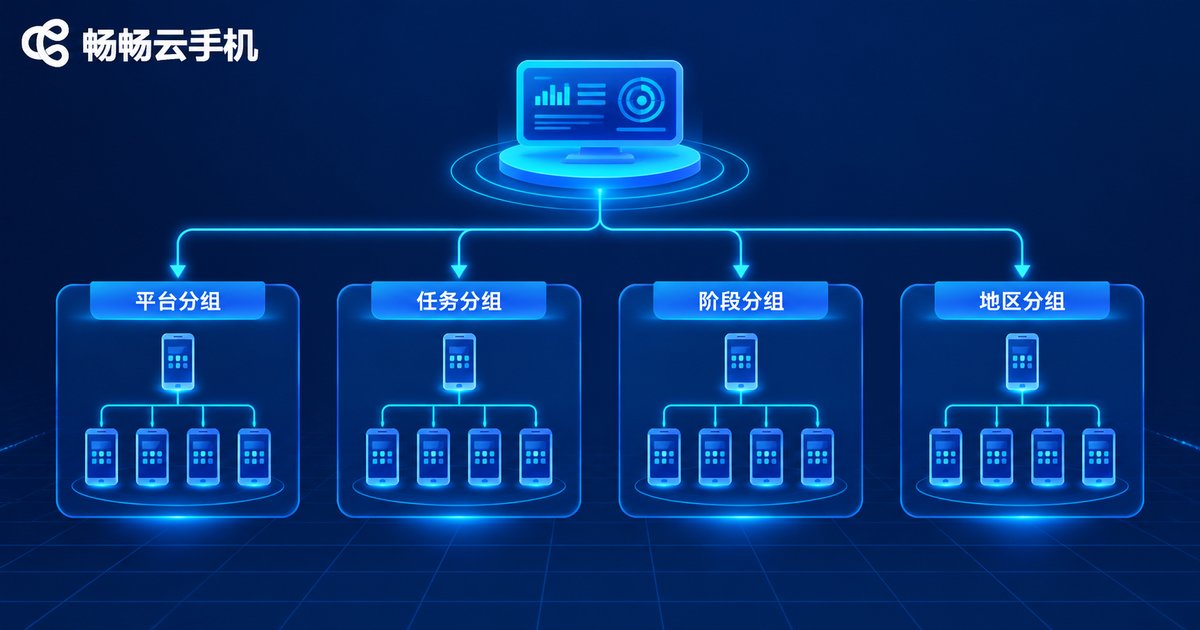
Many beginners spin up dozens of cloud phones, pile them into one list, and three days later can't remember which device does what. Grouping is the only way to turn “a pile of devices” into “a coordinated team.” We recommend four dimensions:
Dimension 1: By platform/project. The most common. One group per platform, with accounts, materials, and SOPs mapped one-to-one — easy to troubleshoot when something goes wrong.
Dimension 2: By task type. A warming group only engages, a publishing group only handles content, a task group only runs scripts. Different rhythms, zero interference.
Dimension 3: By operation stage. Manage cold-start, growth, and mature accounts separately — new accounts get low-frequency, gentle actions while aged accounts scale up, avoiding anomalies from aggressive new-account behavior.
Dimension 4: By region/line/device model. Cross-border businesses group by market; testing businesses group by model — cleaner environment isolation.
Add a naming convention, e.g., project-platform-purpose-number (like “beauty-douyin-warming-013”), so anyone taking over can tell each device's role at a glance.
After Grouping: The Right Way to Batch-Operate
Grouping isn't a one-and-done setup. Real efficiency comes from this combination:
Batch install/uninstall: select a group and install the same app set across all its phones in one click — new-account setup shrinks from half a day to minutes.
Synced operations: tap, swipe, and type on one “master device” while the whole group follows in real time — ideal for unified engagement and browsing.
Scheduled tasks: set different execution times per group — warming in the morning, publishing at noon, tasks overnight. Devices work around the clock with a human-like rhythm.
Group inspection: review online status and task completion group by group daily; pull out abnormal devices individually without disturbing the rest.
In one sentence: grouping is the skeleton, batch operations are the muscle, scheduled tasks are the heartbeat. With all three in place, one person can keep dozens of cloud phones perfectly organized.
Put Batch Group Control and Group Management into Practice with ChangChang Cloud Phone (ccloudphone)
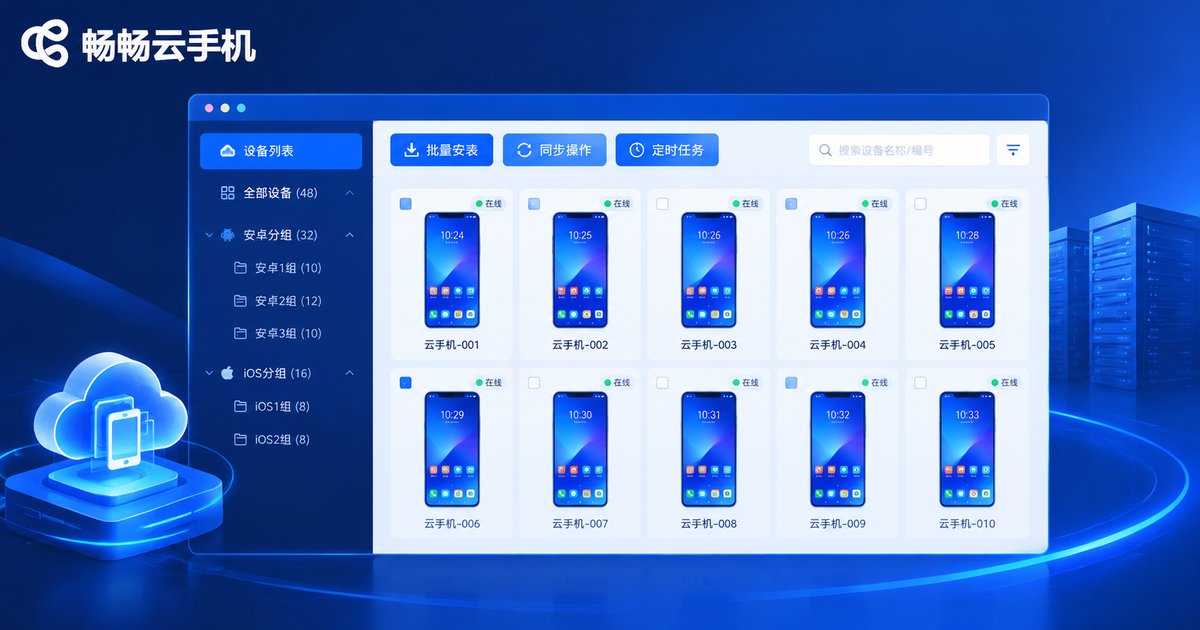
If you're ready to build your own cloud phone group-control system, take a look at ChangChang Cloud Phone (ccloudphone). It provides Android environments in the cloud, with a console that supports unified management of multiple cloud phones, featuring visual grouping, batch install/uninstall, and synced group control. When your business grows, simply add cloud phones on demand — no hardware purchasing or maintenance required.
For individual studios, its value is low-cost entry with on-demand activation; for teams, a unified console keeps multi-person collaboration organized. For the latest plans and feature details, check the official ChangChang Cloud Phone website and choose a configuration that matches your scenario and scale.
FAQ
Q: How many cloud phones can one computer control in batch?
The theoretical limit depends on the provider's console. ChangChang Cloud Phone supports unified management of multiple cloud phones. In practice, it's wiser to control group by group, keeping each group within a size you can comfortably handle for better stability.
Q: Will group-controlled operations get accounts banned?
Group control is just a tool; risk comes from behavior. Keep one account per phone, mimic human rhythm, avoid high-frequency repetitive actions, and stagger operations by group and time slot. With compliant operation, risk is manageable.
Q: How does cloud phone group control differ from physical phone farms?
Physical farms require buying phones and racks plus power and network bills, with slow scaling. Cloud phones activate instantly, scale on demand, support remote management, and stay online 24/7 in the cloud — far lower cost and maintenance burden.
Q: Is there a limit on the number of groups? What's the best way to divide them?
There's generally no hard limit. The principle is “one group, one purpose”: each group maps to a clear platform or task. Keep each group at a manageable size and split into subgroups as you scale, with a unified naming convention.
Q: How many phones should a beginner start with?
Start with 3–5 phones to validate your workflow. Once account environments, SOPs, and grouping logic are stable, scale up gradually. Learn to manage first, then add volume.


