

What Is a Cloud Phone API? Developer Scenarios for Cloud Devices
In One Sentence: A Cloud Phone API Is the 'Remote Control' for Cloud Devices
Conclusion first: a cloud phone API is a set of interfaces that lets your code operate cloud phones instead of your hands.
A cloud phone is not hard to understand—it is not the physical device in your pocket, but a virtual Android phone running in a cloud data center: a full Android system that can install apps, log into accounts, stream videos, and play games. You connect through a web console or client and operate it like a remote desktop.
But here comes the question: if you have 10, 100, or even 1,000 cloud phones, do you really want to tap through them one by one? That is where the API comes in. An API (Application Programming Interface) is like a back door the cloud phone opens for developers—write a few lines of code, and your program automatically does everything a human operator would.
Think of it this way: the cloud phone is your employee, the web console is you hovering over their desk, and the API is a standardized work order you hand to that employee. You say 'power on', it powers on. You say 'open this app and tap ten times', it complies—and you can say the same thing to hundreds of devices at once.
What Can a Cloud Phone API Do? Four Core Capabilities
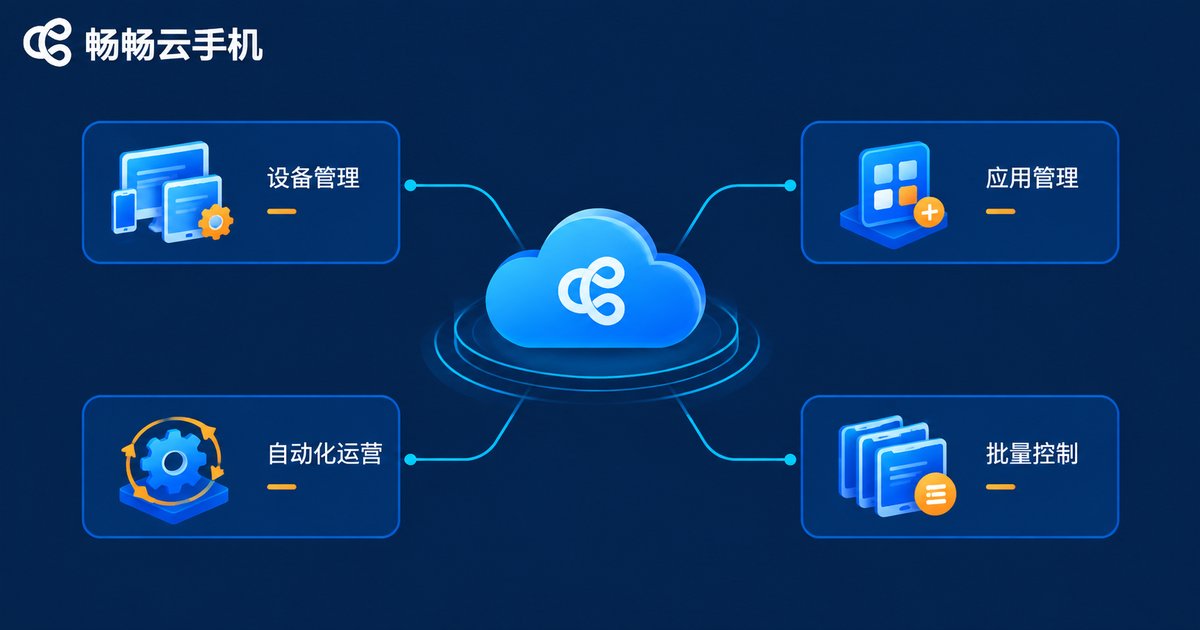
Interface details vary across vendors, but mainstream cloud phone platforms open up roughly four categories of capabilities:
1. Device lifecycle management
Power on, power off, reboot, reset, create new devices, release devices. This is the most fundamental layer—the master power switch for your device fleet.
2. App management
Upload APKs, silently install, uninstall, and launch specific apps through the API. Anyone doing automated testing knows this workflow well—no more manually dragging installation packages around; code handles it all.
3. Automated operations
Simulated taps, swipes, text input, screenshots, and screen streaming. This is where the API delivers the most value: paired with mainstream UI automation frameworks, a cloud phone operates apps just like a real person.
4. Bulk control
Send one command to many devices simultaneously. This is a key advantage over local emulators—cloud devices are naturally built for centralized, one-to-many management.
Six Real-World Scenarios for Developers
Enough theory—here is who actually uses cloud phone APIs, and how.
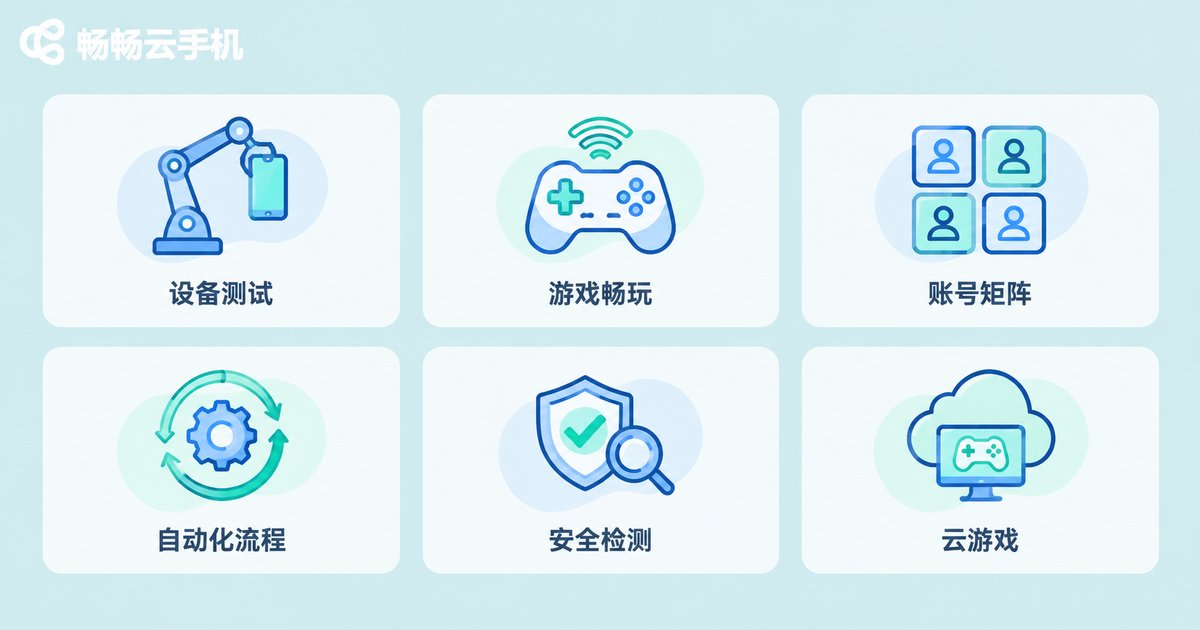
Scenario 1: Automated app testing
The most orthodox use case. Before every release, QA teams must verify app compatibility across dozens of device models. With a cloud phone API you can spin up devices in bulk, auto-install the new build, execute test scripts, and collect screenshots and logs—the whole suite runs overnight and the report is waiting the next morning. No racks of physical phones, no device lab to maintain.
Scenario 2: Multi-account gaming and idle farming
Game studios and heavy players run daily quests and level alt accounts on cloud phones. The API adds real leverage: bring all devices online on a schedule, auto-run check-ins and daily routines, and automatically restart devices after disconnections. The daily chores of hundreds of accounts, managed by one person.
Scenario 3: Matrix account operations
Teams running short-video or social media matrices often operate dozens or hundreds of accounts at once. APIs enable bulk publishing, scheduled engagement, and unified device environment management—each account runs on its own independent, stable cloud device, avoiding the chaos and risk of many accounts sharing one environment.
Scenario 4: RPA workflow automation
Some enterprise apps (attendance, approvals, inspections) offer no open interfaces yet still require scheduled, repetitive operations. Cloud phones plus automation scripts become the 'build your own API' solution—handing repetitive mobile tasks over to programs.
Scenario 5: Compatibility and security testing
Beyond functional testing, security teams use cloud devices for vulnerability verification and suspicious-app behavior analysis—running risky apps inside a cloud sandbox. If something breaks, you simply reset one cloud phone; no real hardware is ever at risk.
Scenario 6: Cloud gaming and instant trials
Game publishers use cloud phones as click-and-play entry points: users tap a link and start playing instantly, while APIs schedule cloud devices, inject the game, and stream the screen back.
Cloud Phones vs. Emulators vs. Physical Device Farms: One Table
Many developers hesitate: if all three can run apps in bulk, which one should you pick? This table says it all.
| Dimension | Cloud Phone | Local Emulator | Physical Device Farm |
|---|---|---|---|
| Deployment | Cloud data center | Your own computer | Self-built racks |
| Hardware cost | Pay as you go, zero hardware | Consumes local resources | High purchase and maintenance cost |
| Scale | Elastic, dozens to thousands | Limited by your PC | Limited by space and staffing |
| Uptime | Always-on in the cloud | Depends on your PC staying on | Needs dedicated staff |
| Isolation | Independent environment per device | Shares local network environment | Independent but complex to manage |
In short: the bigger your scale and the higher your uptime requirements, the more cloud phones stand out. For temporarily debugging one or two small scripts on your own machine, an emulator is still handier.
What Does Integration Look Like? Four Steps
Do not be intimidated by the three letters 'API'—mainstream cloud phone integration follows a highly standard path:
# Pseudocode: the simplest cloud phone automation flow
1. Get credentials   → Create an API Key in the console
2. List devices      → GET /devices                Retrieve available cloud phones
3. Send commands     → POST /devices/{id}/command  Install app, tap, screenshot
4. Poll for results  → GET /tasks/{task_id}        Collect screenshots, logs, etc.
Most endpoints are plain HTTP requests returning JSON. Any developer who can call an API or write a crawler will get the hang of it in half a day. The real challenge is not technical—it is breaking down your business process: you must design exactly what you want the devices to do.
Choosing a Platform: What Should Developers Look For?
A few practical tips before you commit:
API completeness: Are device management, app management, and automation endpoints all covered? Is the documentation clear? Is there a usable debugging environment?
Stability and concurrency: Do bulk commands drop tasks? What is the device disconnection rate? This directly determines whether your automation jobs are reliable.
Device performance: Are the CPU and memory specs enough to run your target apps smoothly? Screen fluidity matters most for gaming scenarios.
If you are looking for a developer-friendly cloud phone platform, check out ChangChang Cloud Phone (ccloudphone). It provides stable cloud Android devices with centralized multi-device management and automation-friendly scenarios, plus a simple console that suits everyone from individual developers to small and medium teams. Start with a small-scale trial, validate your workflow end to end, then scale up gradually—that is the safest integration pace.
FAQ
Q: How is a cloud phone API different from an emulator?
An emulator runs on your own computer and consumes local CPU and RAM—open too many instances and your machine struggles first. Cloud phones run in data centers, so device count, stability, and uptime are not limited by your local hardware. Their device environments are also closer to real phones, which helps with apps that apply strict environment detection.
Q: Can I use a cloud phone API without coding skills?
The API is fundamentally a developer tool, but many platforms—including ChangChang Cloud Phone—offer graphical bulk-control features right in the console, covering most batch management needs without writing code. The API suits advanced users who need deeply customized automation.
Q: What tech stack do I need for API integration?
Mainstream cloud phone APIs are HTTP endpoints returning JSON. Python, Java, Go, Node.js—any language that can send HTTP requests works. Basic API-calling skills are enough; no Android internals knowledge required.
Q: Are accounts safe on cloud phones?
Reputable platforms provide an independent device environment for each cloud phone, keeping accounts isolated. When choosing a service, focus on stability reputation and data security practices, and enable two-factor authentication for critical accounts.
Q: How many accounts can run on one cloud phone?
Best practice is one primary account environment per cloud phone—the standard approach for matrix operations. Multi-instance cloning exists, but its stability and isolation still fall short of the one-device-one-account setup.


